


Federated Anchors: Simplifying Linkerd Multicluster Trust and Certificate Rotation


November 11, 2026
Trust is the beating heart of Linkerd.
OK, fine, we can be a little less dramatic about that. But, one of the most important things that Linkerd does is set things up to allow microservices to communicate securely with one another, and a cornerstone of secure communication is trusting that you're talking to who you think you are. Linkerd trust has the nice property that it works the same way for one cluster and for many clusters – but day 2 operations around multicluster trust can be quite a bit more painful than for single-cluster setups.
We're going to take a look at how to make multicluster trust less annoying to deal with, focusing on one of the trickiest bits of multicluster operations: certification rotation.
Certificates in Linkerd
As we've talked about in many different places, Linkerd trust is based on X.509, which relies on certificates. As described in the Linkerd documentation, Linkerd uses a chain of three certificates:
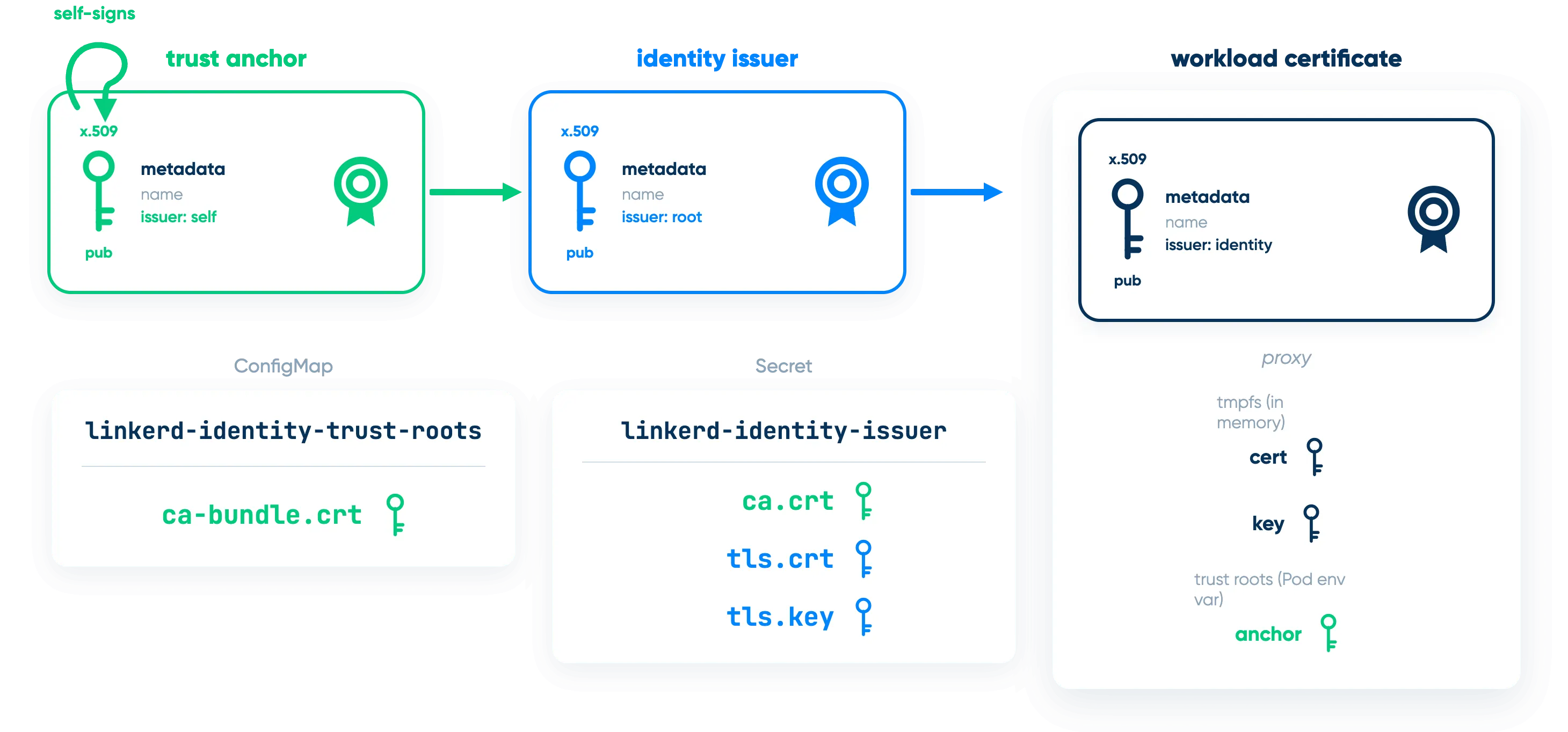
When one workload tries to talk to another, they exchange workload certificates, which are signed by the identity issuer, which is signed by the trust anchor. Each workload verifies the signing chain all the way up to the trust anchor, and everything has to line up for the connection to succeed.
In the multicluster world, trust is still based on verifying certificate signatures, but it now has to work across clusters! The way people usually get told how to set this up (including in our own multicluster documentation) is to have all the clusters share a single trust anchor, but give each cluster its own identity issuer:
%20Multi-Workload%20Trust%20Diagram-selection.webp)
There are a lot of good reasons to do things this way: it lines up nicely with the single-cluster case, it's easy to explain, and it works – all good things. On the other hand, you really should be rotating that shared trust anchor on a regular basis, and in this model, that's a pretty complex operation.
To see why, let's start with a look at trust anchor rotation with just a single cluster.
Trust Anchor Rotation With One Cluster
The first thing to realize is that even though we often talk about a Linkerd cluster having a trust anchor, what it actually has is a trust bundle. The difference is that where the trust anchor is one certificate (by definition), the trust bundle can hold multiple certificates. When Linkerd traces the signature chain for a workload cert, any certificate in the trust bundle is as good as any other.
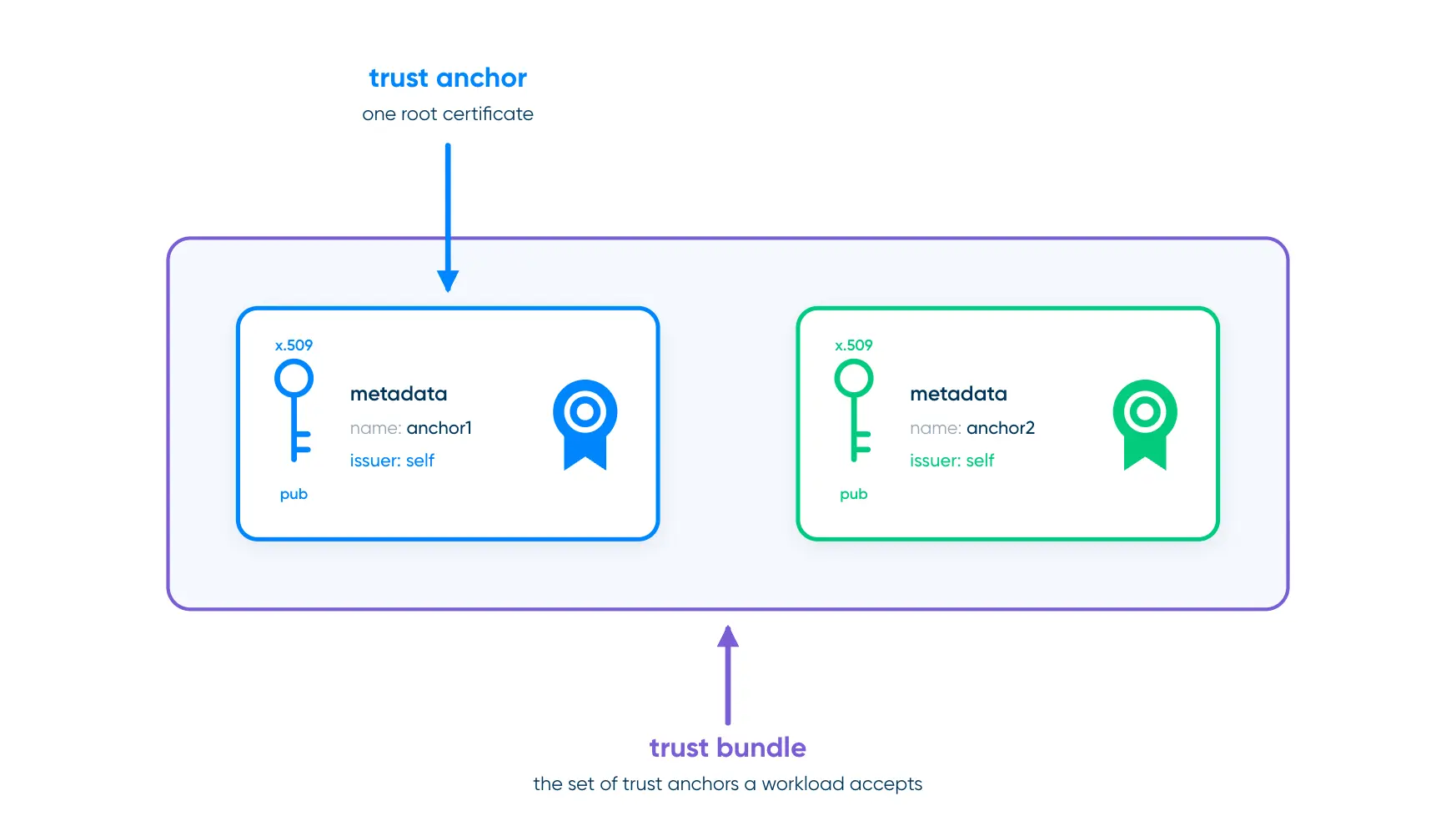
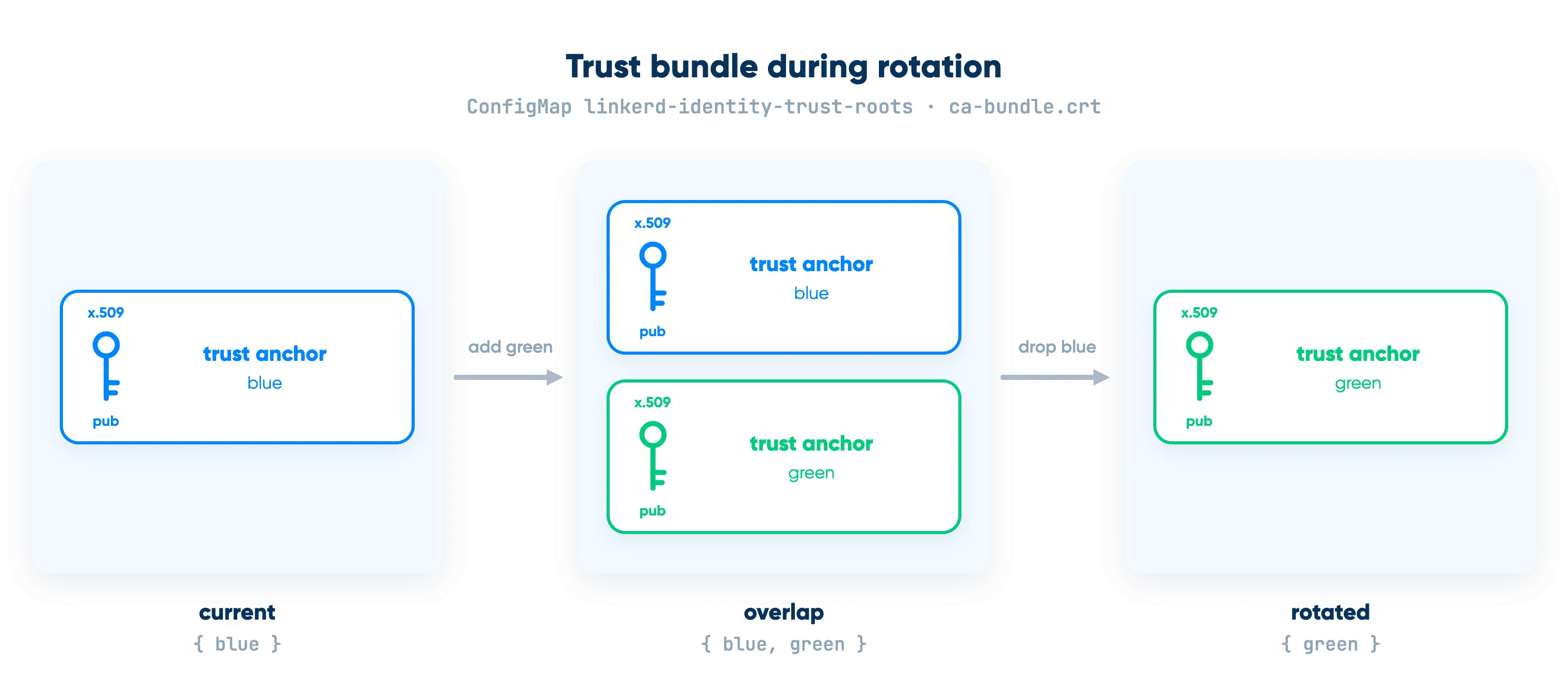
Using a bundle is the reason that zero-downtime trust anchor rotation is possible at all. You can't atomically swap the trust anchor across every meshed workload simultaneously – instead, there's a multi-step process for rotating a trust anchor:
- Start by assuming that the cluster is using trust anchor
blueand identity issuerblue-id(which is signed byblue), but we want to switch to using trust anchorgreenand identity issuergreen-id(which is signed bygreen). - Add
greento the cluster's trust bundle. At this moment, the bundle contains bothblueandgreen, and either is fine for establishing that an identity is valid.
- Restart the Linkerd control plane so that everything in the control plane is using the updated trust bundle.
- Restart all of the meshed workloads on the cluster so that all the proxies in the cluster are using the updated trust bundle. At this point, both
blueandgreenare valid, but the identity issuer is stillblue-idso all our workload certificates are still ultimately signed byblue.
- Update the identity issuer to
green-id. Newly-created pods will now get workload certificates ultimately signed bygreen, but there are still plenty of running pods with workload certificates signed byblue.
- Restart the control plane again, then restart the meshed workloads again. At this point, everything in the system will be using a workload certificate ultimately signed by
green. blueis no longer relevant. However, everything has a trust bundle declaring thatblueis still valid.
- Remove
bluefrom the trust bundle. - Restart the control plane and all meshed workloads one final time.
This, finally, gets everyone to a trust bundle in which only green is valid.
This isn't a particularly difficult process, but it's time-consuming and requires paying careful attention to avoid mistakes like skipping steps or accidentally picking the wrong certificate – and if you do make mistakes, you probably take downtime. (This is why we recommend checking out the Trust Anchor Rotation Operator in Buoyant Enterprise for Linkerd, which makes it much simpler!)
What About Multicluster?
In multicluster, you follow the same process, but there's a twist: remember how we talked about every cluster sharing the same trust bundle? What that really means is that each cluster keeps its own copy of the trust bundle, and all the copies have to be kept in sync – so every time you modify a certificate or restart, you have to do that on every cluster at the same time.
So when you add green to the trust bundle, you have to add it to the trust bundle on every cluster. Then you have to restart the control plane on every cluster. Then you have to restart the meshed workloads on every cluster. This rapidly gets much more error-prone than the single-cluster case.
It's also potentially more subtle when things go wrong. Suppose you have clusters called east and west, and the workloads in east only call other workloads on east. One critical workload in west, though, makes heavy use of a workload in east. If the trust bundles on east and west get out of sync, it's not hard to land in a situation where things look great in east, but west is totally down because it suddenly can't talk to east.
I've gone through this myself for two or three clusters, and it's manageable but annoying. We have users with many more clusters than that, though, and there needs to be a better way.
The Better Way: Federated Anchors
The better way is something I've been calling federated anchors (paralleling the way Linkerd has "federated services"). In the grand tradition of fixing problems in computing by throwing a layer of indirection at it, the federated-anchors concept works by sneaking an extra layer of certificates into the cluster.
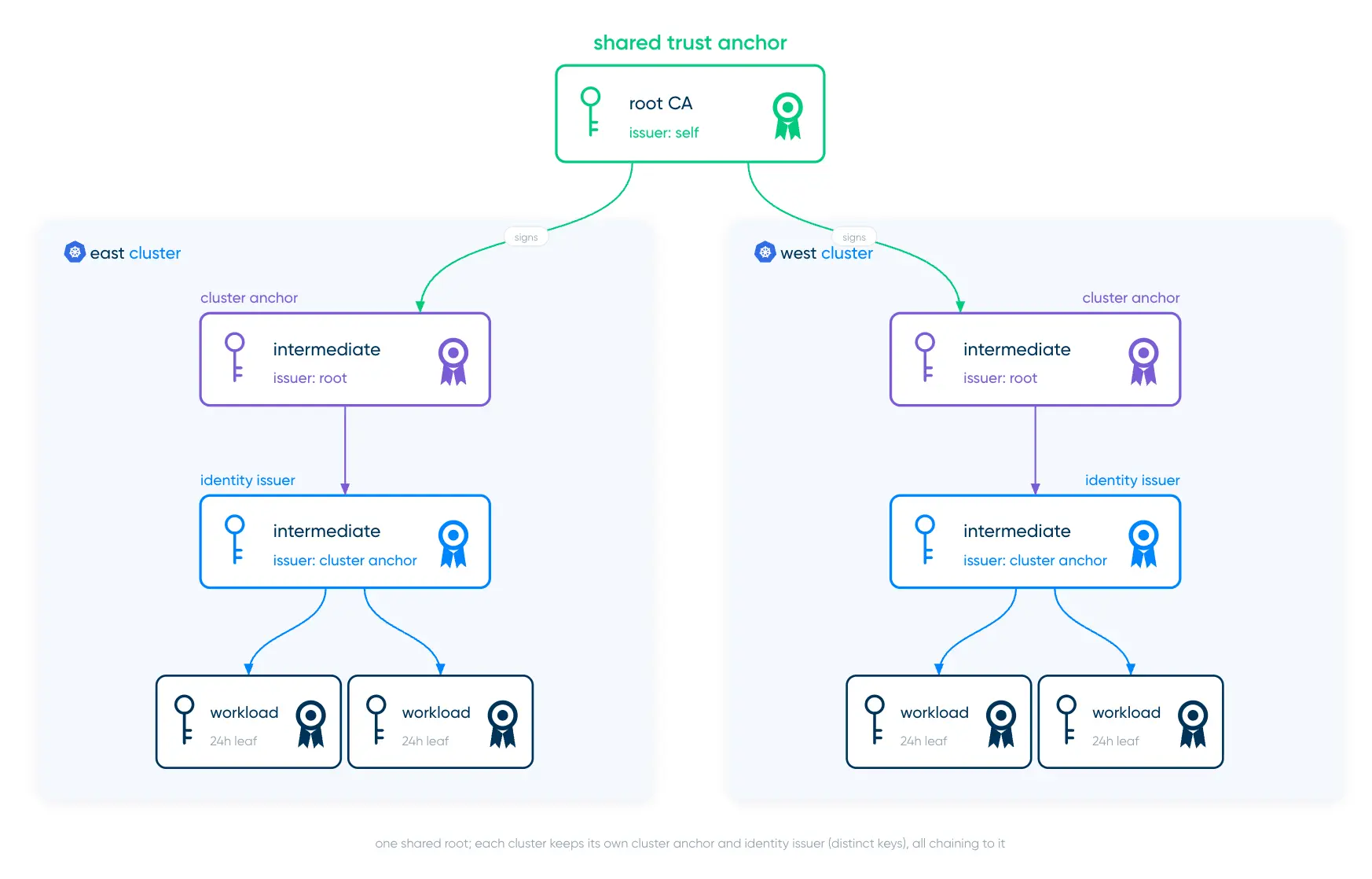
In this model, the trust anchor still spans all the clusters, but there's an extra cluster anchor for each cluster. This setup has some interesting characteristics:
- Multicluster still works because, ultimately, everything is signed by the same trust anchor, which means that the whole trust chain stays intact.1
- Cluster anchors have much the same security profile as single-cluster trust anchors: their secret keys are infrequently used and can easily stay completely off the cluster. In fact, the cluster anchor’s secret keys should stay completely off the cluster: Linkerd doesn’t need access to them at all.
- Using the cluster anchor to sign the identity issuer means that the trust anchor's secret key is used even less frequently than before, making it safer to allow the trust anchor to be very long-lived.
- Finally, the coup de grace: you can rotate cluster anchors and identity issuers one cluster at a time, without ever having to touch the other clusters, while maintaining zero downtime.
How Federated Anchors Work
Federated anchors work by taking advantage of a little-known fact about Linkerd: the identity issuer is also actually a bundle. It's not widely advertised (yet!) because it's rarely useful in the single-cluster case, but including multiple certificates in the identity issuer Secret works just fine. You only get one private key (which is a feature in this case, not a bug), and it pretty much only makes sense if the multiple certificates form a signing chain – but some pretty fascinating use cases lie well within those boundaries.
If we have clusters named "east" and "west", and we want to use federated anchors:
- We'll have a single shared trust anchor. Call this
anchor1. - Each cluster will have its own cluster anchor:
east-anchor1for the east cluster, signed byanchor1west-anchor1for the west cluster, also signed byanchor1.
- Each cluster will also have its own identity issuer:
east-id1for the east cluster, signed byeast-anchor1west-id1for the west cluster, signed bywest-anchor1
Remember that each of these has a public half (e.g. anchor1.pem) and a private half (e.g. anchor1.key). So to configure Linkerd on the east cluster:
- We'll put
anchor1.peminto theca-bundle.crtkey of the linkerd-identity-trust-rootsConfigMap on both theeastandwestclusters. - For the
eastcluster:- We'll concatenate
east-anchor1.pemandeast-id1.pemand store that in thecrt.pemkey of thelinkerd-identity-issuerSecret. - We'll store
east-id1.keyin thekey.pemkey of thelinkerd-identity-issuerSecret.
- We'll concatenate
- For the
westcluster, we’ll do the same arrangement but usingwest-anchor1andwest-id1. - We'll let Linkerd worry about the workload certs, as always.
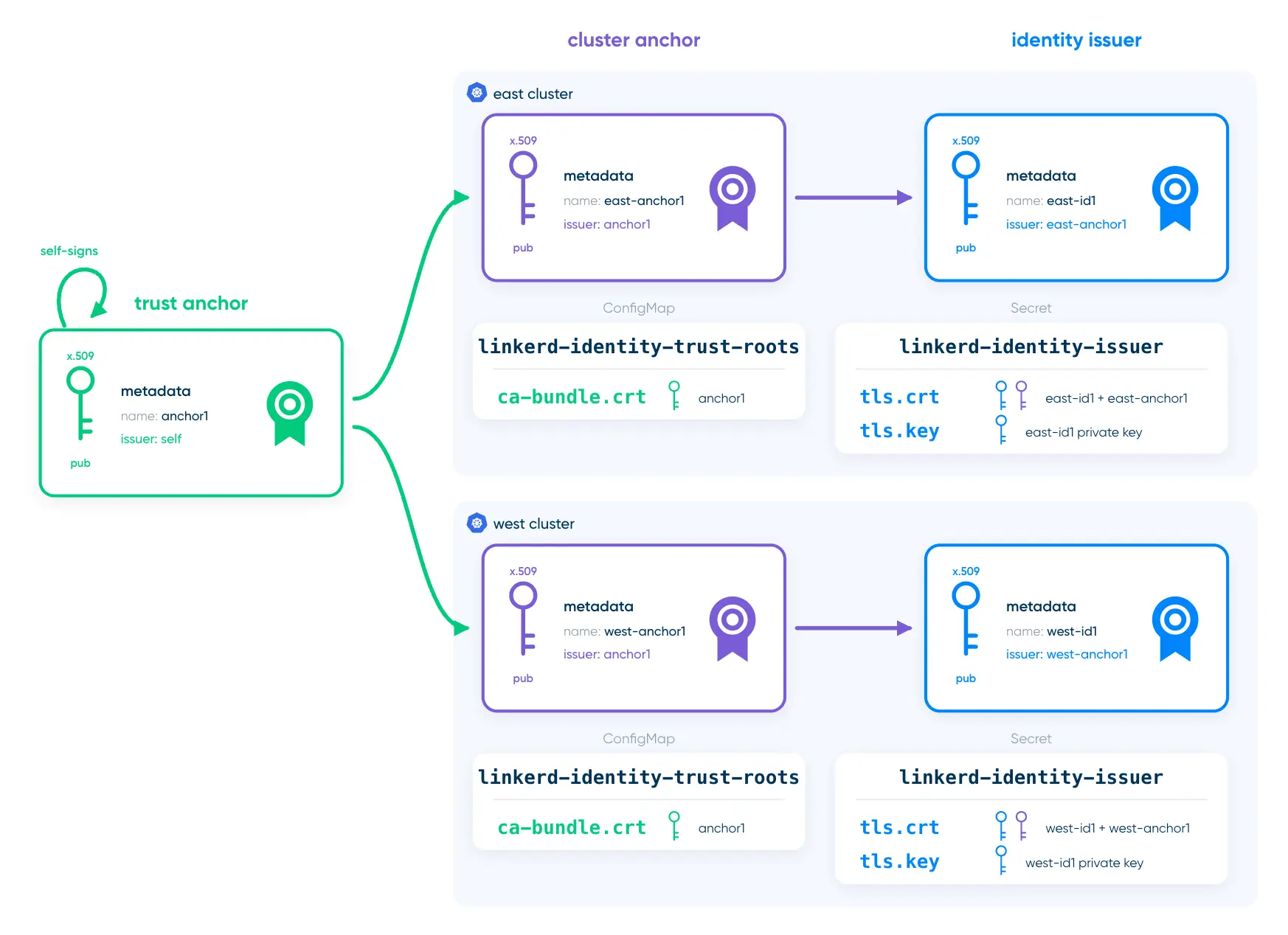
Read that very carefully: the trust bundle always contains the public half of anchor1, and the identity issuer Secret contains the private key of the cluster’s identity issuer along with the public halves of both the cluster anchor and the cluster’s identity issuer. The only private key you need on the cluster is the one for the identity issuer. Ideally, you’ll never store the private key of any anchor on the cluster.
Setting Up With linkerd x-trust
We'll show all of this using the linkerd-x-trust extension, which you can find at https://github.com/kflynn/linkerd-x-trust. While everything we're about to do can be done with shell commands and certificate tools like the step CLI from Smallstep, linkerd-x-trust is built to make Linkerd certificate handling a bit simpler. Check out the README for how to install it, and always remember that linkerd-x-trust is experimental: it’s not maintained by the Linkerd team, and unlike most Linkerd CLI commands, it will directly modify your cluster if you tell it to. So be careful out there.
Creating the trust anchor
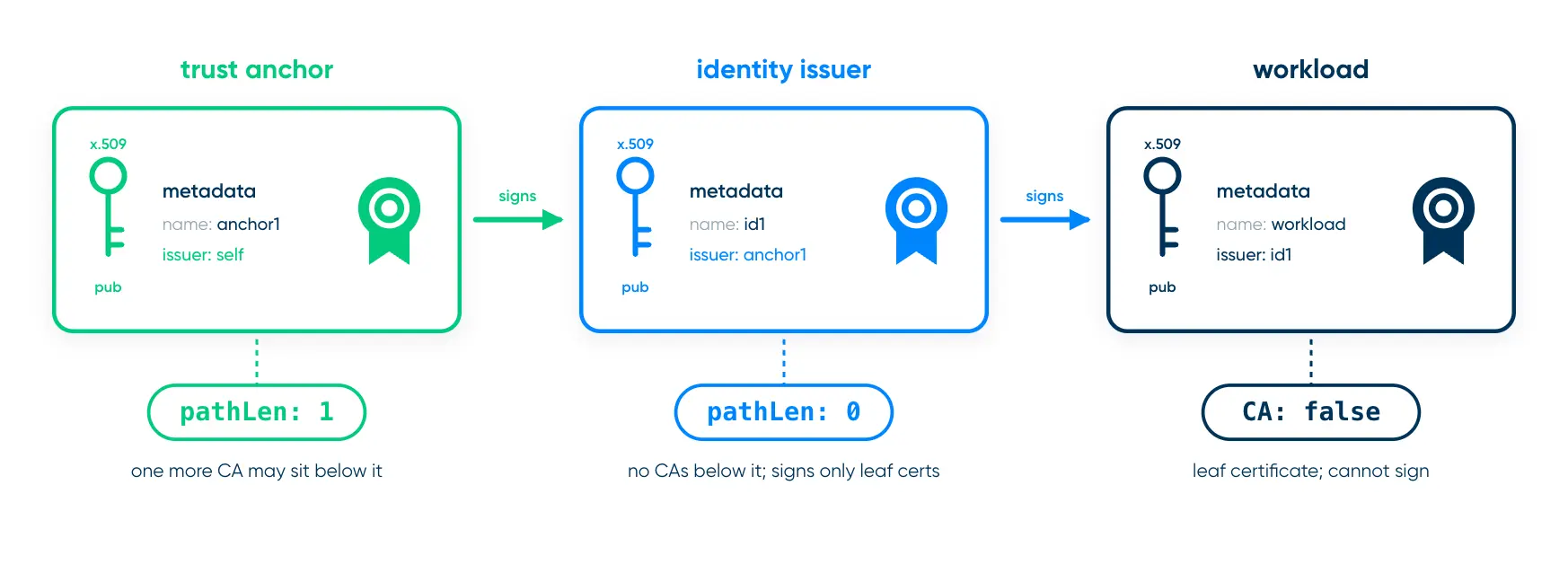
Creating a self-signed trust anchor with linkerd-x-trust is straightforward, with one caveat: we have to be careful about the X.509 path length.2 The path length for a given certificate is basically the maximum number of signing certificates that can be in the certificate chain below that one. In the typical case where the Linkerd trust anchor signs the identity issuer and the identity issuer signs workload certificates, the trust anchor has a path length of 1 and the identity issuer has a path length of 0.
With the cluster anchor in the picture, though, the trust anchor needs a path length of 2 and the cluster anchor needs a path length of 1. (The identity issuer still has a path length of 0.)
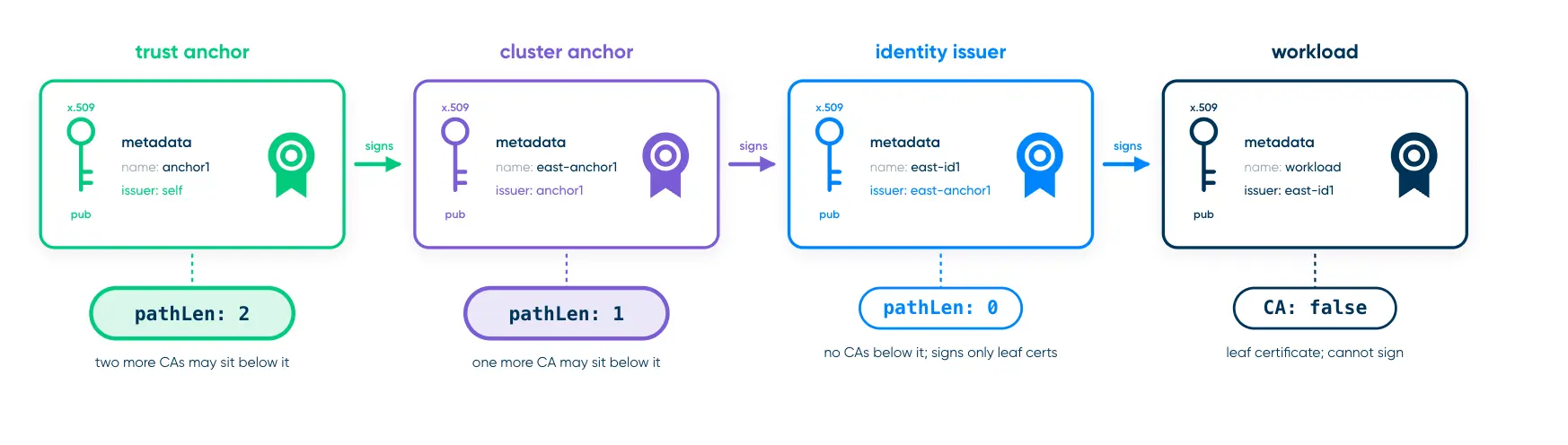
So we’ll start by generating our shared trust anchor, making sure to set its path length to 2:
linkerd x-trust anchor generate --pathlen 2 \
   anchor1.crt anchor1.key
This will write anchor1.crt and anchor1.key, containing the trust anchor we'll use.
Next, we'll create cluster anchors east-anchor1 and west-anchor1. Under the hood, cluster anchor certificates look exactly like identity issuer certificates except for the path length, so we can use linkerd x-trust issuer generate while overriding the path length for this. We'll also override the DNS name contained in the certificate – Linkerd doesn't use this name for anything, but it can make life easier when debugging if we choose unique values.
linkerd x-trust issuer generate anchor1.crt anchor1.key \
   --identity "east-anchor.linkerd.cluster.local" \
   --pathlen 1 \
   east-anchor1.crt east-anchor1.key

linkerd x-trust issuer generate anchor1.crt anchor1.key \
   --identity "west-anchor.linkerd.cluster.local" \
   --pathlen 1 \
   west-anchor1.crt west-anchor1.key
Finally, we create east-id1 and west-id1. For this, we don't really need to override anything (the normal identity issuer that linkerd x-trust creates will work fine) but we'll override the DNS name to be unique again.
linkerd x-trust issuer generate east-anchor1.crt east-anchor1.key \
   --identity "east-issuer.linkerd.cluster.local" \
   east-id1.crt east-id1.key

linkerd x-trust issuer generate west-anchor1.crt west-anchor1.key \
   --identity "west-issuer.linkerd.cluster.local" \
   west-id1.crt west-id1.key
Given all the certificates, we can then push them out for Linkerd to use them (which, of course, requires Linkerd to be running):
linkerd x-trust --kubeconfig east-kubeconfig.yaml \
  bundle add anchor1.crt

linkerd x-trust --kubeconfig east-kubeconfig.yaml \
  identity update east-anchor1.crt east-id1.crt east-id1.key

linkerd x-trust --kubeconfig west-kubeconfig.yaml \
  bundle add anchor2.crt

linkerd x-trust --kubeconfig west-kubeconfig.yaml \
  identity update west-anchor1.crt west-id1.crt west-id1.key
Remove any leftover trust anchor from the trust bundles using linkerd x-trust bundle remove, then restart Linkerd and any meshed workloads with kubectl rollout restart. After that, you should be able to verify a four-certificate chain for each cluster:
linkerd x-trust --kubeconfig east-kubeconfig.yaml chain

linkerd x-trust --kubeconfig east-kubeconfig.yaml chain
Rotating a Cluster Anchor
Once you have all of that in place, rotating a cluster anchor only touches that single cluster. For example, to rotate the east cluster's cluster anchor:
- Generate a new cluster trust anchor and identity issuer, possibly with linkerd
x-trust issueras shown above:
# Don't forget the path length here!
linkerd x-trust issuer generate anchor1.crt anchor1.key \
   --identity "east-anchor2.linkerd.cluster.local" \
   --pathlen 1 \
   east-anchor2.crt east-anchor2.key

linkerd x-trust issuer generate \
   east-anchor2.crt east-anchor2.key \
   --identity "east-issuer2.linkerd.cluster.local" \
east-id2.crt east-id2.key- Update the identity issuer bundle on the east cluster to have all four east certificates:
linkerd x-trust issuer update \
    east-anchor1.crt east-id1.crt east-anchor2.crt east-id2.crt \
    east-id1.key
Note that we still passed east-id1.key here – we can't change that yet.
- Restart the Linkerd control plane, then restart all meshed workloads. Again, this happens only in cluster 1. (Alternately, you can wait a day or so for all the workloads to get new workload certificates. We’ll assume that you don’t want to do this.)
- Switch the identity issuer to use
east-id2's private key (all that changes here is the last parameter):
linkerd x-trust issuer update \
    east-anchor1.crt east-id1.crt east-anchor2.crt east-id2.crt \
east-id2.key- Restart the Linkerd control plane and meshed workloads again.
- Drop the original cluster anchor and identity issuer from the bundle:
linkerd x-trust issuer update \
    east-anchor2.crt east-id2.crt \
east-id2.key- Finally, restart one more time.
This is still a bit of a process, but it only involves a single cluster now, which makes life vastly better. The cluster-specific keys don't need to get tangled up in all the other clusters.
What About Rotating the Trust Anchor?
Sadly, federated anchors don't help with the process of rotating the actual trust anchor: to do that still requires wrangling every cluster in lockstep. (In fact, you'll also have to generate new cluster anchors as well, so arguably it's slightly more annoying.)
The important bit, though, is that you shouldn’t have to actually do that very often at all. The trust anchor’s private key is used only for signing the cluster anchors, which happens only when you rotate a cluster anchor. Since you’ll be using that key so infrequently and you don’t have to expose it to the cluster at all, it's safe to give the trust anchor a very long lifespan. Federated anchors also make rotating cluster anchors sufficiently less painful that you can do that more often. (In fact, the
So while federated anchors don't eliminate the need to handle keys safely, they do eliminate a painful operational headache, replacing it with one that's much more tractable and, ultimately, much more in keeping with Linkerd’s goal of operational simplicity.
FAQs
What are federated anchors in Linkerd?
Federated anchors are a design pattern that adds a per-cluster "cluster anchor" between the shared trust anchor and each cluster's identity issuer. Multicluster mTLS still works because every workload certificate still chains up to the same trust anchor, but the cluster anchor can be rotated without downtime, without interacting with other clusters, and without storing the cluster anchor’s private key on the cluster.
Why is multicluster trust anchor rotation hard without federated anchors?
Every cluster needs its own copy of the shared trust bundle, and all the copies have to stay in sync. Each step of the rotation (adding the new anchor, switching issuers, removing the old anchor, and all the restarts in between) has to be done on every cluster before proceeding to the next step, and a mismatch can break cross-cluster traffic in ways that are easy to miss.
Do federated anchors need a special version of Linkerd?
No. They rely on the fact that Linkerd's identity issuer Secret can already hold a certificate bundle. You put the cluster anchor and the identity issuer certificate in the issuer Secret, and the trust anchor in the trust bundle.
Do I need linkerd-x-trust to set up federated anchors?
No. Everything in this post can be done with shell commands and certificate-management tools like the step CLI; linkerd-x-trust just makes the process a little simpler.
What path length must the certificates use?
For federated anchors, the trust anchor needs a path length of 2 instead of its usual 1, each cluster anchor needs a path length of 1, and each identity issuer keeps the normal path length of 0.
Can I rotate a cluster anchor without downtime and without having to touch every cluster?
Yes. Rotating a cluster anchor and its identity issuer only touches that one cluster: add the new certificates to the issuer bundle, switch to the new private key, then drop the old certificates, restarting the control plane and meshed workloads after each step.
Do federated anchors make it easier to rotate the shared trust anchor?
Not particularly. Rotating the trust anchor itself still requires updating every cluster in lockstep, plus generating new cluster anchors. The benefit is that the trust anchor's private key is used so rarely that it's safe to give it a very long lifespan, especially if the private key is kept off the cluster (as it should be).
1Everything also works fine if every cluster has its own trust anchor and all the trust anchors appear in every cluster's trust bundle. Unfortunately, it doesn’t make things any easier to do it that way: rotating any of the anchors still requires touching all the clusters. It's actually worse than the single shared anchor setup, in fact: the straightforward way to rotate all the anchors means restarting every cluster multiple times for each cluster's trust anchor.
2You can read about X.509 path length in RFC 5280 §6.1 if you really really want to, but wow is it dry.


