LinkedIn


Service Mesh Architecture: A Technical Deep Dive Into Linkerd's Control Plane, Data Plane, and Proxy
Jun 2026
If you've read the conceptual overview of what a service mesh is, you already know the basics. There is a control plane, and there is a data plane with proxies everywhere. What you actually need when you're deploying Linkerd on a production cluster is the component-level view. What runs where? What happens when a pod starts? What breaks if the control plane goes down at 3am?
This post covers Linkerd's architecture at the depth a platform engineer or SRE needs to operate it. Everything below reflects current stable Linkerd releases. We assume you run Kubernetes; we don't assume you've run a mesh, so terms get defined the first time they appear.
The two planes: a quick orientation
The data plane sits where traffic flows. A small sidecar proxy (linkerd-proxy) runs next to every application container, in the same pod, and handles all TCP traffic in and out of that pod.
The control plane is where configuration lives. It runs as a set of services in the linkerd namespace and tells the proxies what to do: where to send traffic, what to allow, and what certificates to use. It has 3 core components: the destination service, the identity service, and the proxy injector (architecture reference).
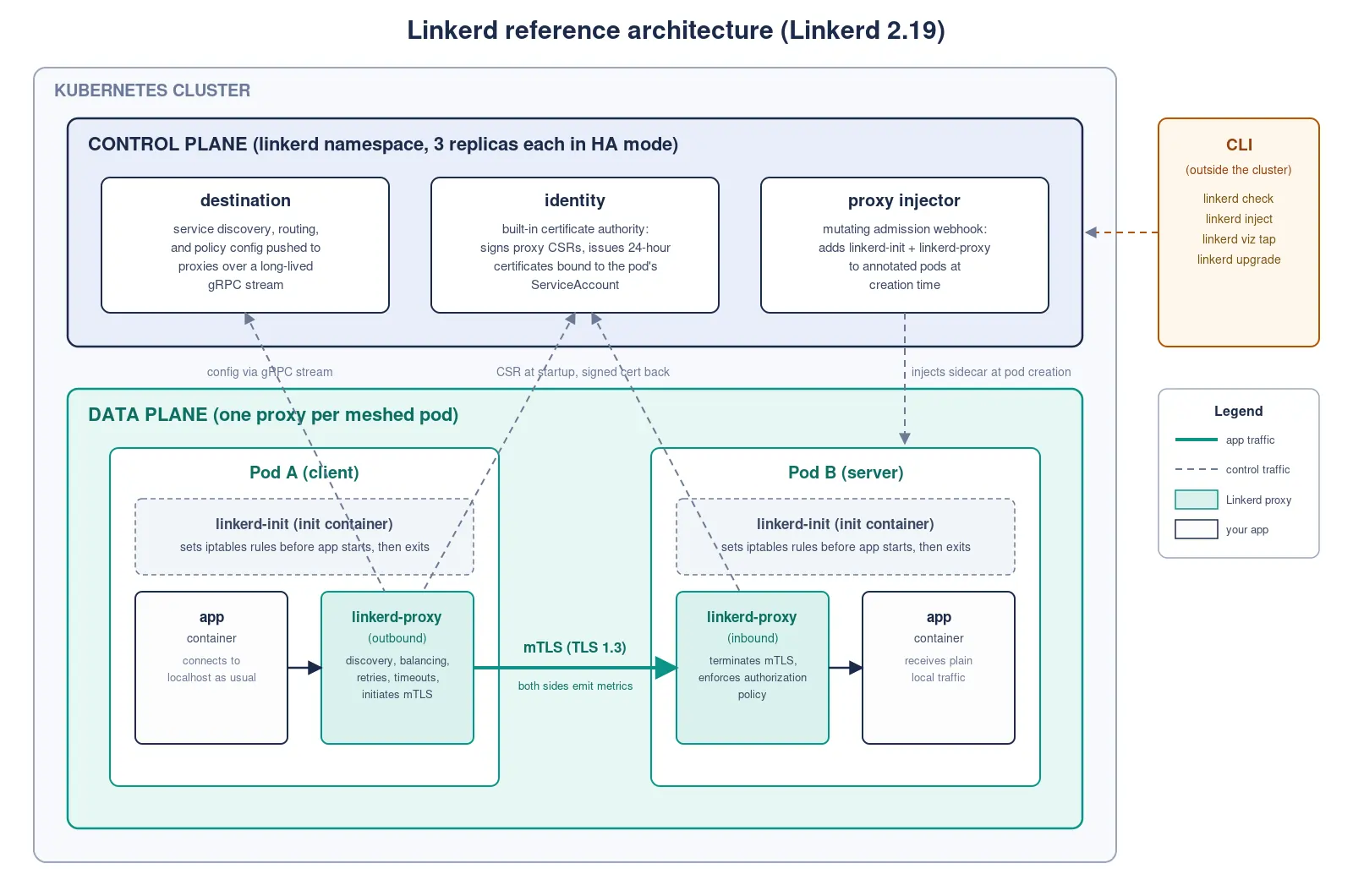
The control plane is small and the data plane is large: one proxy per meshed pod, which at scale means hundreds or thousands of proxies. When you think about resource consumption or upgrades, think about the two separately.
How traffic gets into the mesh
Before mTLS, load balancing, or any other proxy feature can apply, traffic has to pass through linkerd-proxy. Linkerd does this with the linkerd-init init container, which runs before any application container starts and uses iptables rules to redirect all TCP traffic to and from the pod through the proxy. The rules are set once at pod startup, then the init container exits. There's no ongoing cost.
Your application doesn't change. The app opens a connection the way it always has, the kernel redirects it to the proxy, and the proxy makes the actual outbound connection.
One operational note: linkerd-init needs elevated capabilities (NET_ADMIN) to modify iptables. If your security policy doesn't allow that on init containers, Linkerd ships a CNI plugin that moves the iptables work into the CNI layer instead. Same result, different mechanism.
The data plane: Linkerd2-proxy
The entire Linkerd data plane is one binary: Linkerd2-proxy, a micro-proxy written in Rust and purpose-built for the service mesh use case. The maintainers wrote up the full reasoning for building a dedicated proxy instead of adopting Envoy in Why Linkerd Doesn't Use Envoy.
The footprint argument has public numbers behind it. In the May 2021 benchmark (Linkerd 2.10.2 vs. Istio 1.10.0, run on Kinvolk's open-source harness), the maximum memory consumed by a Linkerd proxy averaged 17.8 MB against 154.6 MB for Istio's Envoy. In the November 2021 redux (Linkerd 2.11.1 vs. Istio 1.12.0), Linkerd's data plane used roughly a ninth of the memory and an eighth of the CPU of Istio's at the highest throughput tested. Honest caveat: those runs are reproducible but old, both projects have shipped a lot since, and we haven't published a newer head-to-head. Rerun the harness against your own workload before you quote these numbers in an architecture review.
What the proxy actually does:
- Proxies HTTP/1.1, HTTP/2, gRPC, WebSockets, and arbitrary TCP. Protocol detection is automatic: the proxy identifies the protocol from the first bytes of the connection, with no annotation needed for common protocols.
- Layer 7 load balancing using EWMA, an exponentially weighted moving average of observed response latency. Recent latency counts more than old latency, so traffic shifts toward the endpoints that are fast right now instead of rotating round-robin.
- Layer 4 load balancing for non-HTTP TCP traffic.
- Automatic mTLS for all meshed connections, with certificate issuance and rotation handled for you (details below).
- Prometheus metrics per service and per route: success rates, request rates, and p50/p95/p99 latencies.
- An on-demand tap API for live request inspection without redeploying anything.
- Service discovery via DNS plus a gRPC streaming API from the control plane's destination service.
Outbound vs. inbound: what each side of the proxy does
When pod A calls pod B and both are meshed, 2 proxy instances handle the hop. Same binary, different jobs.
The outbound proxy (pod A's side) does service discovery, load balancing, retries, timeouts, and circuit breaking, and initiates the mTLS connection. It asks the destination service where pod B's endpoints are, what TLS identity to expect, and what routing rules apply.
The inbound proxy (pod B's side) terminates the mTLS connection and enforces authorization policy. Policy is expressed through 2 CRDs (custom resource definitions, the Kubernetes mechanism for adding new API object types): Server, which describes a port on a workload, and AuthorizationPolicy, which describes who may talk to it (authorization policy docs).
Both proxies emit metrics independently, which is why Linkerd reports every hop's latency from 2 perspectives: what the client saw and what the server saw. The gap between them is the network. When that gap is bigger than expected, you've found something worth investigating.
The control plane components
Destination service
The destination service is the proxy's configuration source. Every outbound proxy holds a long-lived gRPC stream to destination and receives updates in real time: endpoint addresses for each service, the TLS identity expected at each endpoint, which requests are permitted, and per-route routing, retry, and timeout configuration.
When you change routing config, destination propagates it over that stream with no proxy restarts. The proxy also holds its last-known configuration, so if destination becomes temporarily unreachable, traffic keeps flowing.
Heads up: 2 generations of routing configuration exist. ServiceProfiles are Linkerd's original mechanism for per-route metrics, retries, and timeouts, and they still work. Newer feature development is focused on the standard Gateway API types, HTTPRoute and GRPCRoute, which Linkerd supports as a core configuration mechanism. If you're starting fresh, learn the Gateway API types first.
Identity service
The identity service is Linkerd's built-in certificate authority (CA). At startup, each proxy sends it a certificate signing request (CSR); identity validates the request and returns a signed certificate tied to the pod's Kubernetes ServiceAccount. That binding gives every workload a cryptographic identity rooted in Kubernetes RBAC (how Linkerd's mTLS works). Meshed connections use TLS 1.3 with hybrid post-quantum key exchange (ML-KEM-768 + X25519).
Proxy certificates live 24 hours and rotate automatically. The certificates you do have to manage sit higher up the chain, and it helps to keep the 3 layers straight:
- The trust anchor is the root CA certificate. The default generated at install expires after 365 days; for production, provide your own with a longer lifetime.
- The issuer certificate and key are what identity signs proxy certificates with. The defaults also expire after 1 year.
- The proxy certificates: 24 hours, rotated automatically, not your problem.
Expired issuer credentials are the classic self-inflicted Linkerd outage, and they're avoidable: set up automatic rotation via cert-manager before the first year is over.
Proxy injector
The proxy injector is a mutating admission webhook: a hook the Kubernetes API server calls during pod creation that may modify the pod spec before it's persisted (Kubernetes admission controllers). Every pod creation triggers the webhook. If the pod or its namespace carries the linkerd.io/inject: enabled annotation, the injector adds linkerd-init, the linkerd-proxy sidecar, and their configuration (proxy injection docs).
Injection happens at pod creation only. Pods already running when you annotate a namespace won't be touched until they're recreated; kubectl rollout restart picks them up.
The CLI
The linkerd CLI runs outside the cluster and talks to both planes. The 4 commands platform teams use most:
linkerd checkruns health checks across the control plane, data plane, and certificates. Run it after every install and upgrade.linkerd injectpipes manifests through injection, useful for GitOps workflows where you want injected manifests in source control.linkerd viz tap streamslive request-level traffic from any meshed workload, no redeploy needed.linkerd upgraderenders updated manifests for the upgrade workflow.
Keep the CLI at the same version as the control plane during upgrades.
Failure modes to know before you go on-call
Control plane unavailable. Data plane proxies keep their last-known configuration and continue forwarding traffic, and established mTLS connections keep working. What degrades: new pods can't get certificates from identity, so new meshed connections may fail mTLS, and service discovery and policy updates stop propagating until the control plane is back.
For production, run the control plane in HA mode: 3 replicas of the critical components, anti-affinity rules that spread them across nodes and zones, and production resource requests. HA mode assumes at least 3 nodes. Enabling it is one flag:
linkerd install --ha | kubectl apply -f -
Proxy injector unavailable. In a default install, a down injector means new pods can start without a proxy. In HA mode the webhook's failure policy is stricter: pod creation that expects injection is rejected until the injector is healthy, so unmeshed pods can't slip into the mesh. You can loosen this by setting the webhook's failurePolicy to Ignore, trading guaranteed injection for guaranteed scheduling (HA docs). Pick the failure you'd rather be paged for.
Certificate expiry. If the issuer certificate expires with no rotation in place, mTLS starts failing for new connections. linkerd check warns ahead of expiry, and the cert-manager setup above removes the problem entirely.
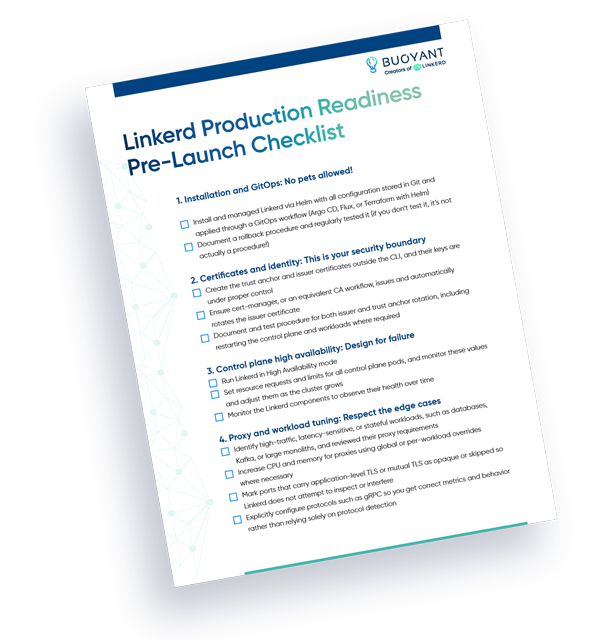
A reasonable starting alert set: issuer or trust anchor expiry within 30 days, proxy injector unhealthy or failing webhook calls, and control plane pods not ready. Our production readiness checklist has the fuller list.
The tradeoffs of a per-pod proxy
Linkerd runs 1 proxy per pod. Some other meshes run 1 proxy per node, shared by every pod on that node. Per-node buys you real things: fewer proxy instances to run and a lower aggregate resource bill. The cost is shared fate and shared identity: pods from different tenants flow through the same proxy, isolation gets harder to reason about, and a shared proxy can't carry a per-workload cryptographic identity the way a sidecar can.
The per-pod model has 2 costs you should plan for. Proxy resources scale linearly with pod count: cheap per instance, a real line item at thousands of pods. And upgrading the data plane means restarting meshed workloads, because the proxy is part of the pod; data plane upgrades ride your normal deployment cadence rather than happening invisibly. We think the isolation and identity properties are worth those costs, and we wrote up the full comparison in Sidecars or Sharing.
See it for yourself
The fastest way to make this concrete is to run it. The getting started guide takes a fresh cluster (kind or k3d on your laptop is fine) to a working mesh with a demo app. Install the CLI, run linkerd install, then linkerd check to watch the health checks pass and linkerd viz tap to watch live requests flow through the proxies you just read about. Questions get answered in the Linkerd community Slack.
Running it in production and want a supported, stable release cadence on top of the same architecture? That's what Buoyant Enterprise for Linkerd (BEL) is for.
FAQ
What is the difference between a service mesh control plane and data plane?
The control plane provides configuration, certificate management, and service discovery to the proxies; it doesn't handle application traffic. The data plane (the proxies) handles actual traffic in real time and pulls configuration from the control plane.
How does Linkerd intercept traffic without changing the application?
An init container (linkerd-init) sets iptables rules before application containers start. Those rules redirect all TCP traffic through the linkerd-proxy sidecar. The application connects normally and the kernel does the redirection.
What happens to meshed traffic if the Linkerd control plane goes down?
Existing meshed connections keep working. Proxies hold their last-known configuration and continue forwarding traffic. New pods starting during the outage may fail to get TLS certificates, which can prevent new meshed connections from completing mTLS. Traffic to unmeshed services is unaffected.
How does Linkerd implement mTLS?
Each proxy gets a short-lived (24-hour) certificate from the identity service at pod startup, bound to the pod's Kubernetes ServiceAccount. When one meshed pod connects to another, the outbound proxy initiates a TLS 1.3 connection and both sides validate each other's certificates. No application configuration required.
What is Linkerd2-proxy and why is it written in Rust?
Linkerd2-proxy is the data plane proxy in every meshed pod, written in Rust for memory safety and a small footprint. Because resource consumption scales linearly with pod count, low per-instance overhead matters. It's purpose-built for the service mesh use case rather than serving as a general-purpose proxy.
Can Linkerd work without the CNI plugin?
Yes. By default Linkerd uses the linkerd-init init container (which requires the NET_ADMIN capability) to set iptables rules. The CNI plugin is an alternative that moves that work into the CNI layer, removing the need for elevated capabilities on init containers.