Kubernetes Multi-Cluster Disaster Recovery with Linkerd & HAZL


September 24, 2026
Meeting contractual requirements and user expectations demands highly available applications. To guarantee that, many platform teams are building Kubernetes clusters spanning multiple on-premises and cloud environments, crossing zones, regions, and even providers. Each layer can fail, though, raising one important question: when disaster strikes, how will your service mesh behave?
If your organization is using (or planning to use) a service mesh in a multi-cluster setup, this post is for you. If you're not there yet, start from this guide to learn more about Linkerd multi-cluster support, then dig deeper into the pros and cons of multi-cluster Kubernetes, and finally explore the three different types of multi-cluster architectures Linkerd supports. There are more resources at the end of this post.
In this post we simulate a real-world multi-cluster setup using both OSS Linkerd and Buoyant Enterprise for Linkerd (BEL), to analyse disaster recovery scenarios specific to service meshes. You will walk away with a clear understanding of what multi-cluster mesh disaster recovery entails, along with tips to simulate it in your clusters, and concrete steps to solve each problem. Without running the demo yourself, the metrics and results should help you improve the resiliency of your mesh, and to understand how Buoyant High Availability Zonal Load Balancing (HAZL) fits in the picture.
First things first: let’s get the basics right
Disaster Recovery (DR) spans different dimensions. Here we focus on the resiliency of services that rely on the mesh to operate (traffic going through proxies, mTLS). We answer the questions "How can my service mesh reduce my availability during an outage?" and "What can I do about it?".
Zones, or availability zones depending on the provider, are isolated failure domains within a region. Each zone has one or more independent datacenters. A fire in one zone shouldn't take the others down (hopefully).
Regions are geographically separate areas, typically hundreds of kilometers or more apart, each containing multiple zones.
The Linkerd introduction to multi-cluster communication names several reasons why people choose to have a multi-cluster mesh setup. This article focuses on separate failure domains: Failure of a cluster allows the remaining clusters to function.
The connection between clusters can be achieved using a shared network or through gateways. When the traffic crosses multiple cloud zones, costs can skyrocket due to unexpected cross-zone data traffic bills. Previously, we introduced the trouble with Kubernetes topology-aware routing (TAR), explaining cross-zone data transfer costs, and how topology-aware routing may result in reduced availability. In a second post, we introduced Buoyant High Availability Zonal Load Balancing (HAZL), which solves both problems: maintaining availability while keeping cross-zone costs low.
A note about availability. If you have a chain of services or components A-B-C, these services are often interconnected (and not independent), so the overall availability depends on your application and infrastructure topology as much as on each single service uptime. In short, everything your services rely on need to be accounted for, mesh included.
The four failure modes
We explore four failure modes of a multi-cluster setup, where three Kubernetes clusters connect through a shared Linkerd service mesh. We'll answer what happens when:
- The mesh control plane fails
- A cluster fails
- A zone fails
- A region fails
For each failure mode, we analyze how the mesh reacts, how it can fail, and provide steps to prevent these issues.
Key takeaways
- A mesh rarely fails by suddenly dropping traffic. It fails by losing the ability to adapt, scale, and operate.
- The mesh adds new points of failures that should be part of your DR drills
- You need a new set of alerts and playbooks that are specific to your mesh topology
The experiment setup
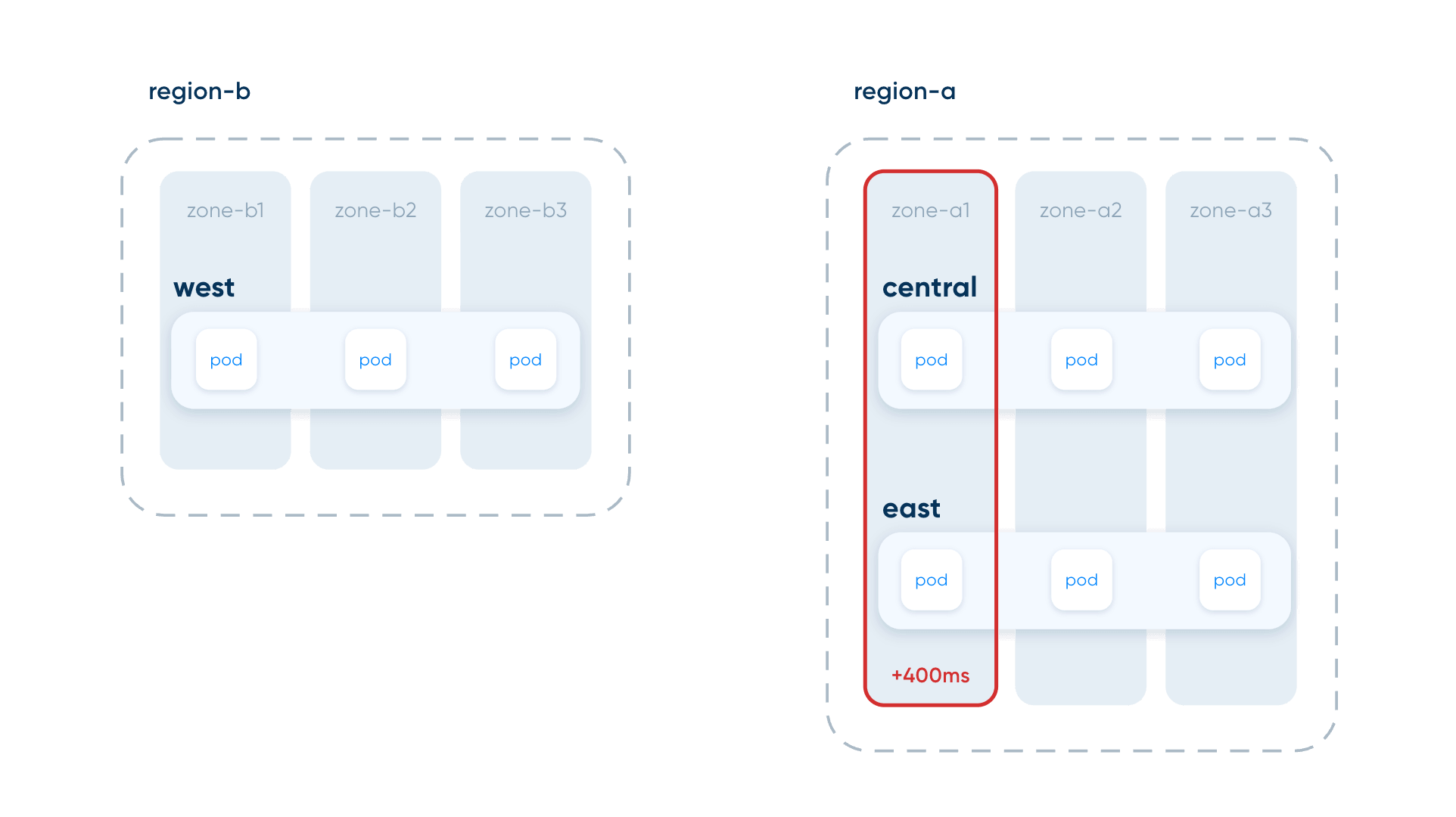
The experiments simulate three clusters: WEST, CENTRAL, and EAST. Clusters run in Docker using k3d on a shared Docker network, leveraging k6 to generate traffic. Faults are simulated by stopping pods and Docker containers (the nodes of the cluster), manipulating the docker network, or by adding latency using Chaos Mesh.
Tools such as Chaos Mesh or LitmusChaos allow you to translate these local simulations into reproducible experiments in your cloud environments, covering dimensions such as DNS faults, node failures, and network faults.
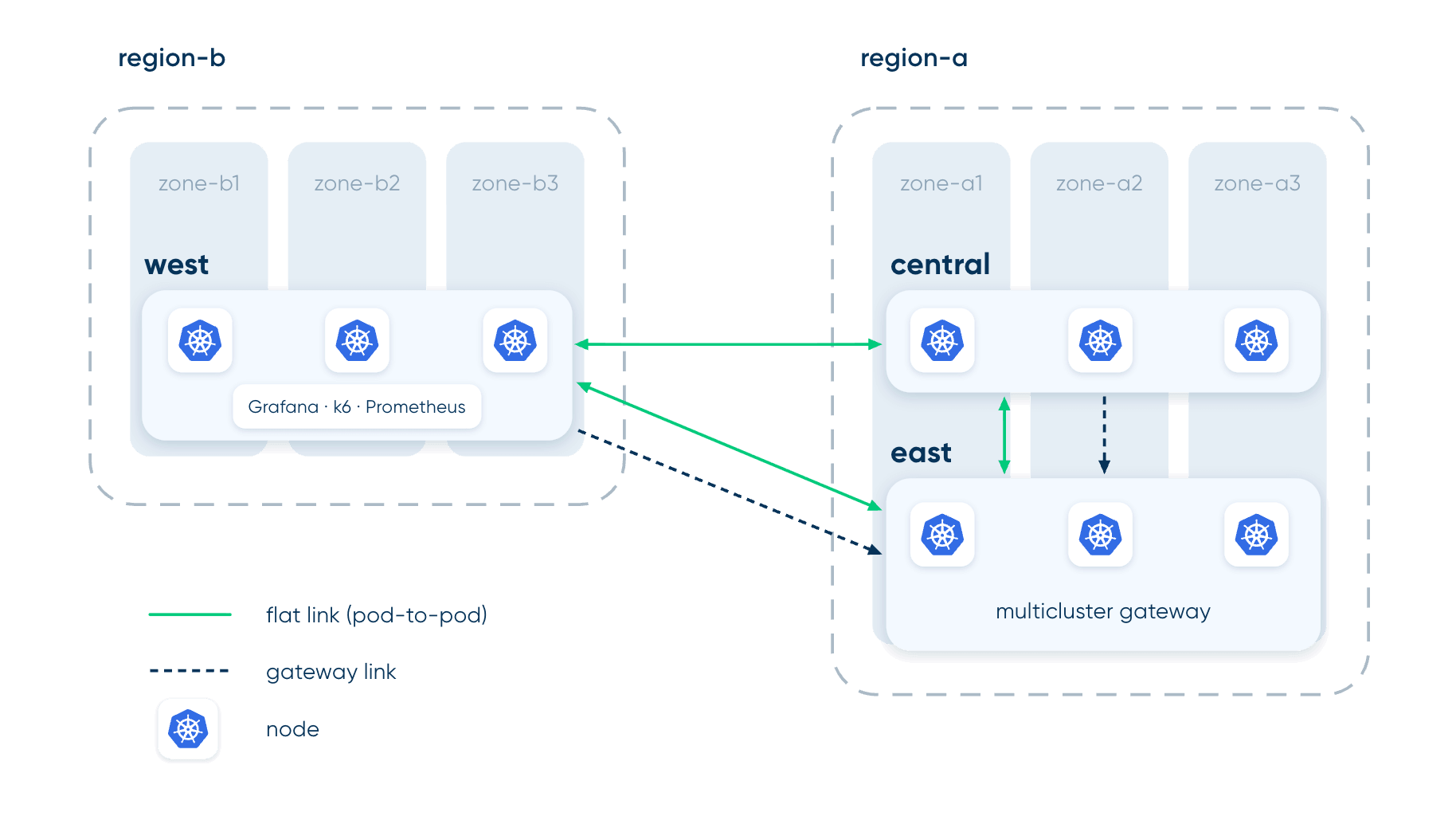
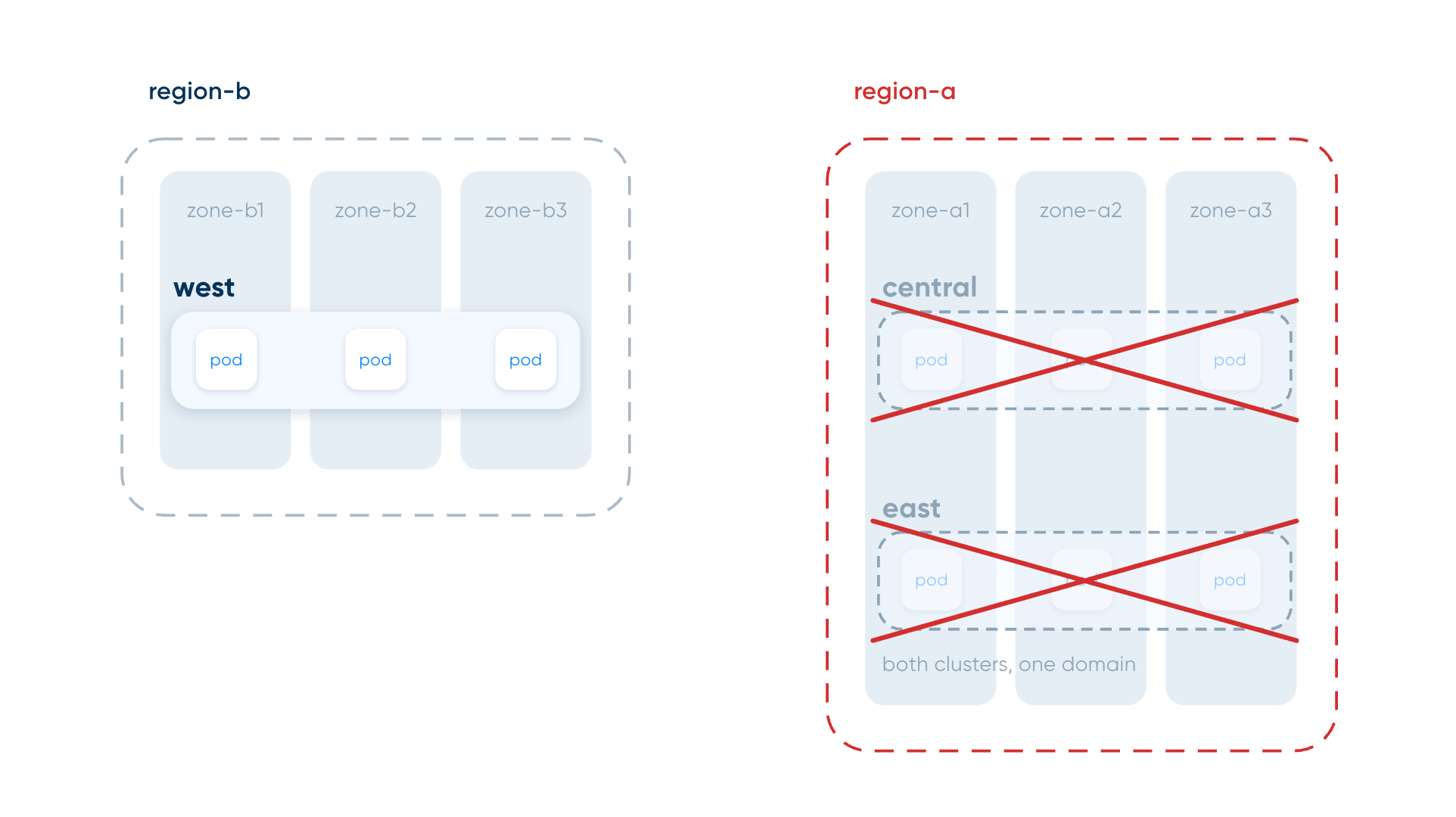
Clusters have 3 nodes, each in a different zone. CENTRAL and EAST are deployed in the same region, while WEST is deployed independently and hosts the load generator (k6) and monitoring stack (Grafana + Prometheus). Faults are simulated only in the CENTRAL and EAST clusters to avoid losing metrics.
We deploy a simple podinfo application with one replica per node, for a total of nine replicas.
To compare behaviors, the application is exposed using all three Linkerd multi-cluster modes:
- app-federated
- app-flat (pod-to-pod)
- app-gateway (hierarchical)
%20Network%20Modes-selection.webp)
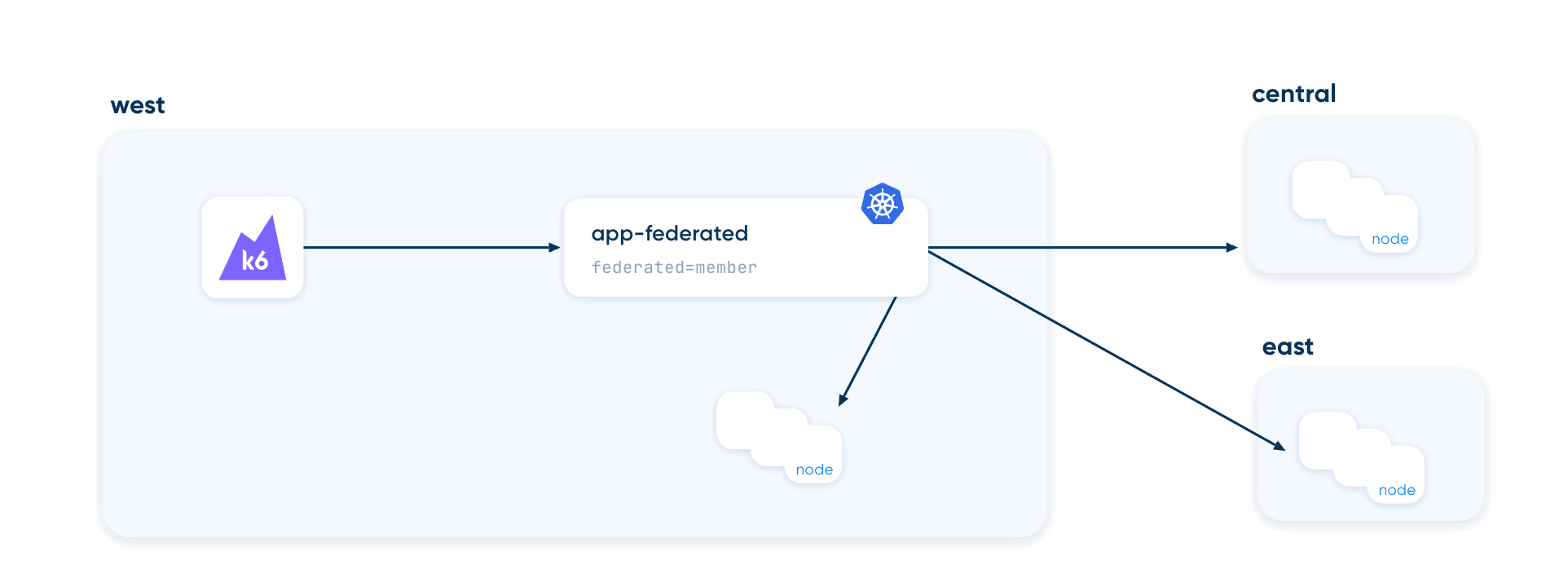
The federated mode creates one logical service and resolves the endpoints for every member cluster.
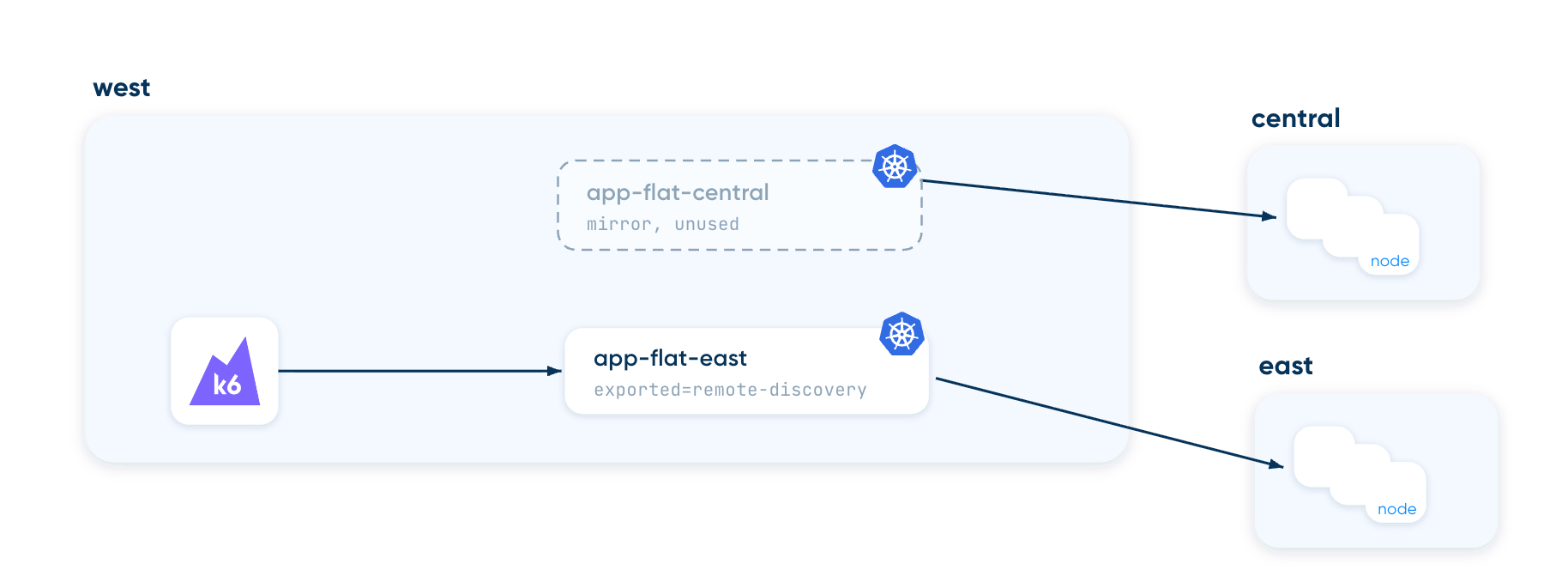
The flat mirror discovers services in remote clusters. The client (k6) chooses which service to use, in our case EAST.
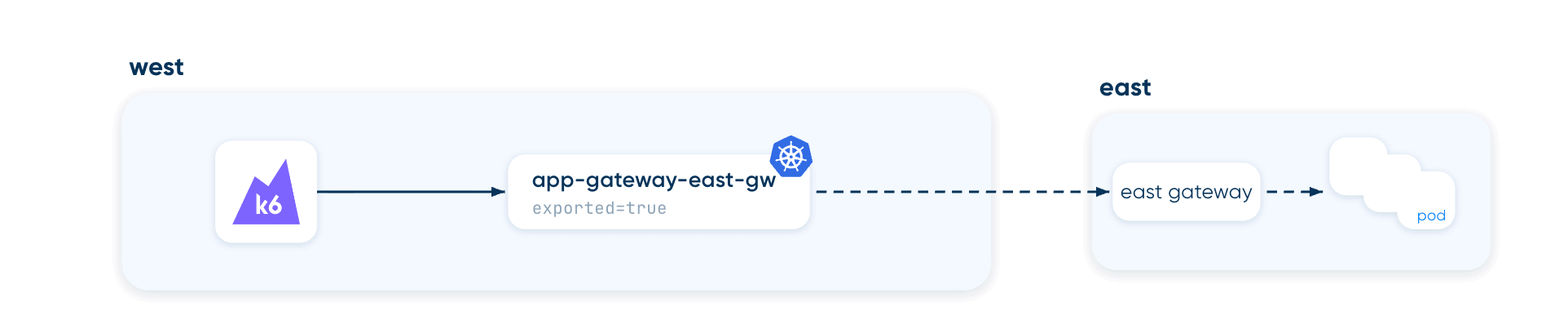
The gateway mirror creates a service on the source cluster whose endpoint is the gateway deployed on the target cluster. Traffic goes through the gateway, and the target cluster resolves the actual pods.
We use a custom Grafana dashboard to monitor the run, with annotations showing the experiment start and finish times, and alerts to track symptoms and errors.
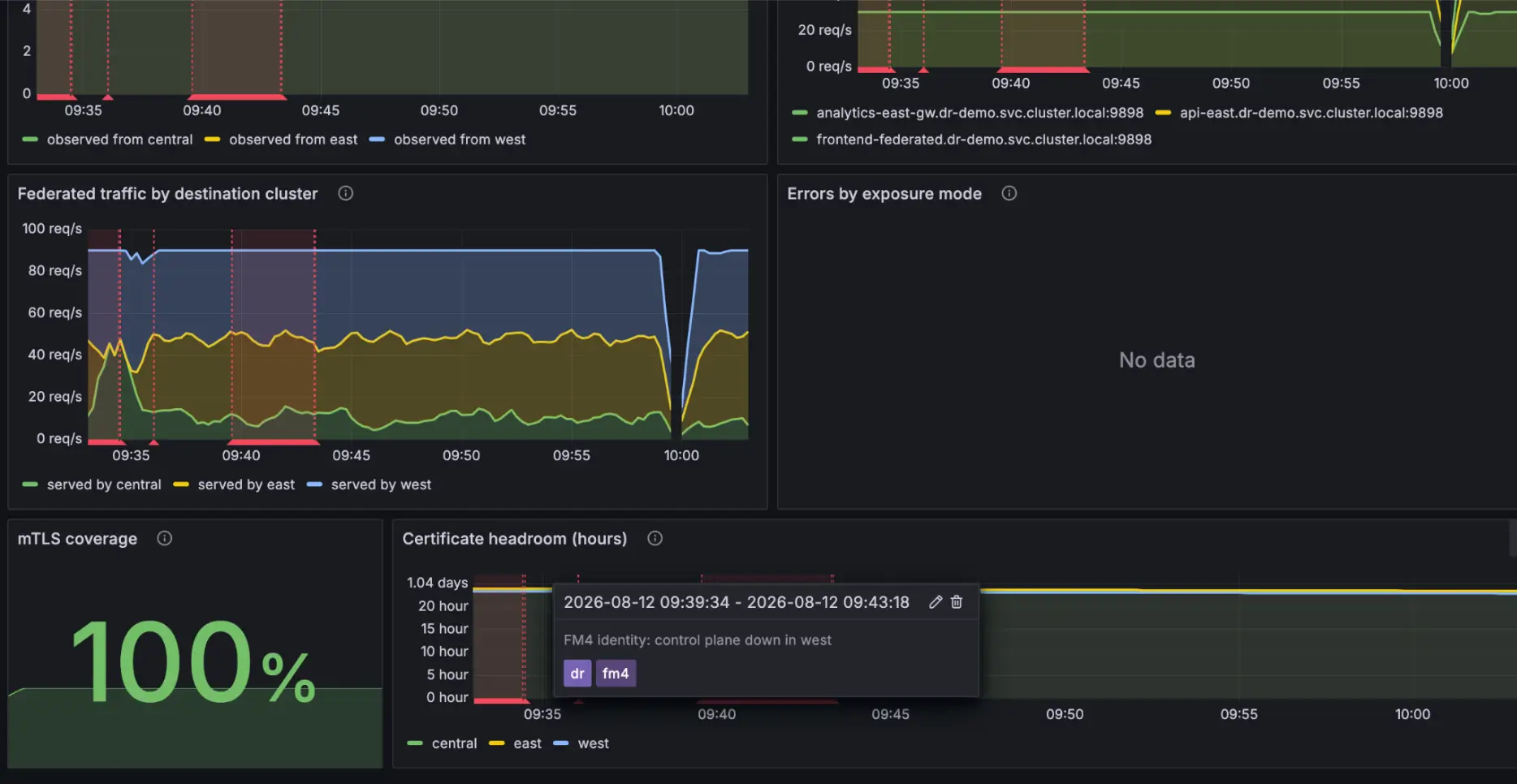
For each experiment, we observe and alert on thresholds based on a set of metrics such as:
- non-mTLS requests
- requests throughput
- requests error rate
- number of federated endpoints
- gateway availability
- locality of traffic (how much traffic is routed to a different zone)
The code and results are on Github. A summary of each run is available in the repo, along with its visual representation. To import the Grafana dashboard and visualize the experiment data, follow these instructions. If you run into problems or want us to run different tests, open a Github issue.
The experiments
The baseline traffic for all experiments is a consistent load of 30 requests per second per exposure mode per cluster, and an even traffic split. Every experiment accounts for one fault, measured across all the three multi-cluster modes.
Experiment 1: control plane failure
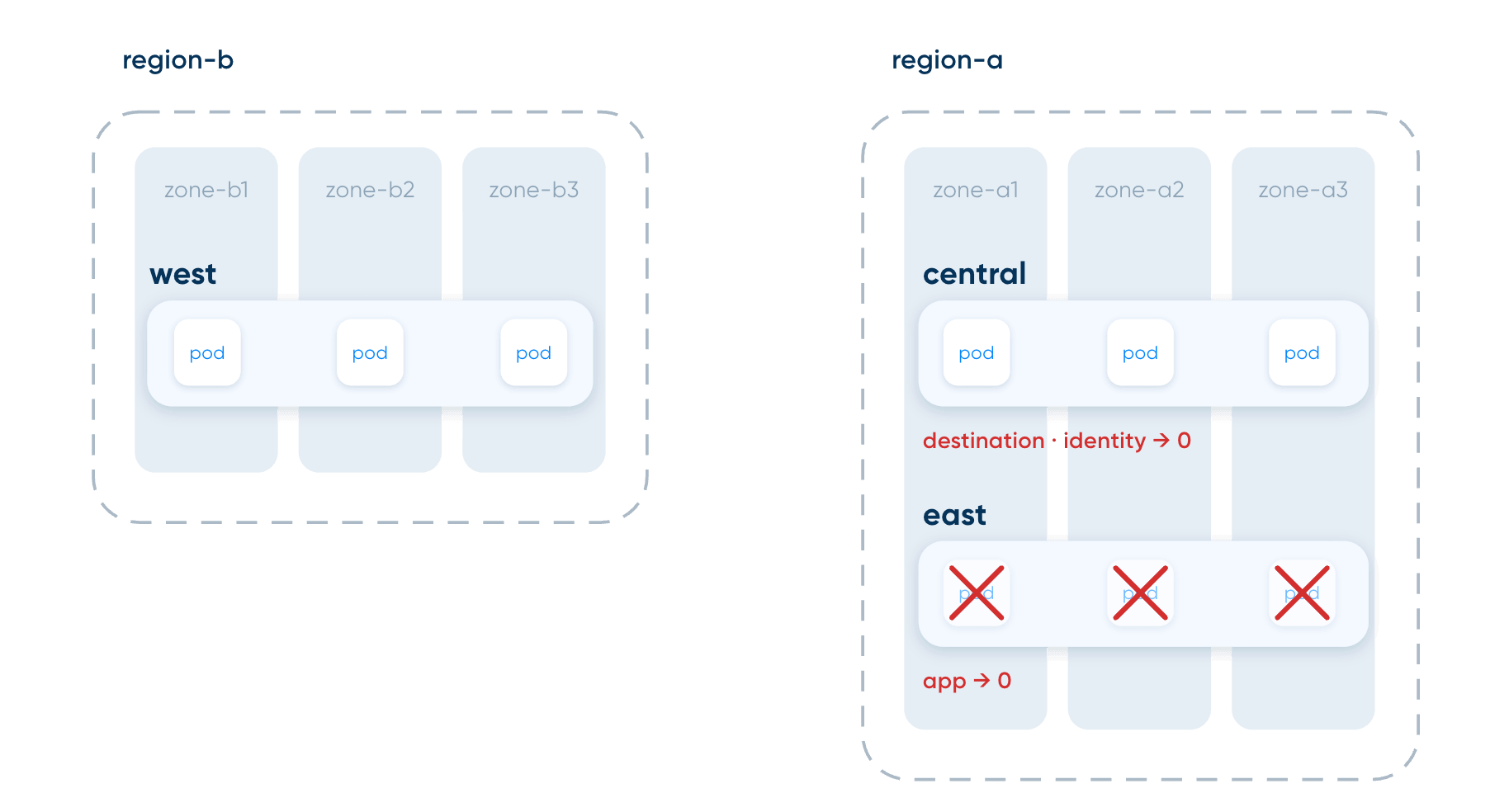
In this experiment, we simulate the failure of the mesh control plane of cluster CENTRAL and watch how it influences the mesh and the traffic between components. The app deployment in EAST is scaled to 0 to perform the test. The Linkerd architecture gives you a detailed explanation of the purpose of each plane service.
Experiment 1a: destination service down
The destination service handles endpoint discovery and runs Linkerd's policy controller. When it's down, endpoint information stops updating. CENTRAL still reported all federated endpoints available after 90 seconds, even though pods in EAST no longer existed. Discovery freezes, and with it the mesh view of the world.
Experiment 1b: identity service down
The identity service issues pods certificates. When down, existing proxies hold valid certificates and keep serving traffic until the certificates expire (by default, up to 24h after the last successful renewal). However, new pods cannot get a certificate and join the mesh, preventing you from scaling up your workflows.
Lessons learned
- Monitor the health of the Linkerd control-plane in your DR dashboard (like Grafana!). Set up alerts for when these services are unhealthy, and when pods are stuck in the initialization phase and unable to join the mesh.
- Pod health probes and other safety mechanisms might temporarily hide issues or shield you from the consequences of an unhealthy mesh.
- Your failover plan requires scaling up, and scaling up requires a healthy control plane. The mesh is a prerequisite for your recovery playbook and might become the bottleneck during an incident. Installation settings such as webhookFailurePolicy determine the behaviour of your mesh during recovery.
Experiment 2: cluster down
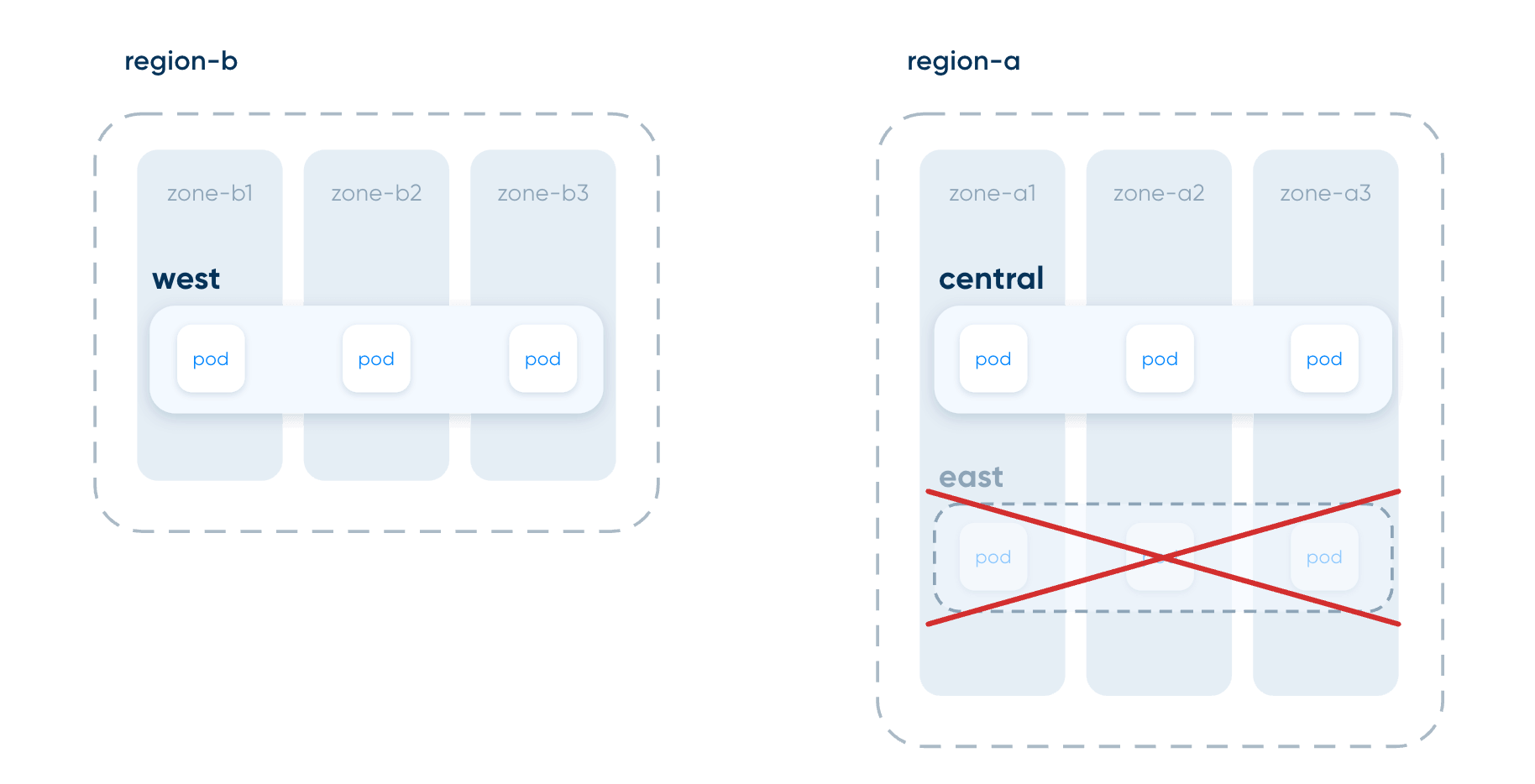
In this experiment we stop all three of EAST’s nodes, then repeat the experiment by deleting the docker network connecting the clusters to simulate a total network failure.
Lessons learned
- Each multi-cluster mode behaves differently and provides different signals, failing either loudly or silently. Make sure you understand how your setup resolves endpoints and looks up backends, whether it’s done on the local cluster (federated or flat-mirror) or on the remote cluster (gateway). This determines how your mesh behaves when a cluster is gone.
- A single alert on error rates isn't enough: when discovery lists endpoints that are unreachable, requests are still forwarded and connections hang until the client times out. Without timeouts, metrics such as request_total don't increment. You can set up timeouts and retries in the client code or with Linkerd.
- Prefer sudden cutoffs over graceful shutdowns in your tests. Graceful shutdowns can be detected by other mechanisms (e.g., health probes), while a sudden cutoff is only detected once endpoint discovery timeouts are hit. This is a better estimate to use for defining your time to detection and time to recovery.
Experiment 3: zone becomes slower
In this experiment we add latency to one zone across the EAST and CENTRAL clusters. Pods remained healthy the entire time.
Lessons learned
- A degraded-but-healthy zone is invisible to topology-based routing, while HAZL adapts and diverts traffic to healthier endpoints.
- At rest HAZL keeps traffic zone-local across cluster boundaries. On open source Linkerd the same workload spreads zone-agnostically, which on a real bill means cross-zone egress on most requests.
- Note: HAZL cross-cluster zone locality currently requires pod-to-pod (flat) multicluster and does not apply to the gateway mode in this experiment.
Experiment 4: region goes down
Both clusters in region-a are disconnected, leaving only WEST up. The surviving region absorbs all traffic.
Lesson learned
Federation copes nicely with the region's loss because pods in WEST are already in the federated service pool. It survives if WEST can absorb the extra load and scale up. If not, make sure your services only accept as many requests as they can handle, and adopt key techniques such as rate limiting and circuit breaking (Linkerd supports that). The other two modes fail because endpoints were in the failed region; this is based on how we designed the simulation architecture rather than a Linkerd limitation.
Three things to do to improve your mesh reliability
1. Verify and understand your installation
This is the step most people skip. Buoyant provides a production checklist that covers common gotchas and shows what a production installation should look like.
There are multiple ways to set up multi-cluster communication with Linkerd. Our experiments show that each topology behaves differently across scenarios, leading to loud or silent errors. Reference the article "Federating clusters for zero downtime kubernetes" for an explanation and chaos test of each.
An example: by following Buoyant’s production installation guide, the deployment defaults to high-availability parameters. If you used the default Helm chart values, that's not the case. The proxy injector parameters in the non-HA defaults are webhookFailurePolicy=Ignore, which admits pods without a proxy (unmeshed) when the injector is down. HA mode switches it to "Fail". In both modes, defaultInboundPolicy defaults to all-unauthenticated, so meshed pods accept non-mTLS traffic unless changed (globally or per namespace). These settings can cause unexpected behaviors during an incident.
2. Improve your alerts
Many mesh failure points don't have standard alerts. Alerts that watch request error rates won't catch control plane issues directly.
Consider measuring signals like:
- Health of the mesh control plane
- Proxy certificates expiration
- Pods failing to join the mesh
- Non-mTLS traffic between services where it is not expected
Reference this article for the metrics.
Simulate a failover and watch if an alert catches the failure. Standard alerts might catch the symptoms (user-facing errors), but not the underlying cause (such as an unhealthy control plane).
3. Test recovery end to end
Document problems, add them to your DR drills, test, and repeat. Pre-made dashboards aren't sufficient to catch all issues, as behavior depends on topology, installation settings, and multi-cluster setup. The only reliable way to ensure your mesh can recover is to test it in your environment.
Testing means injecting faults, determining signals and symptoms, and performing recovery all the way to a baseline state. For example, issues with the identity services might surface only when apps are scaling up. The mesh generated these issues only during recovery: verify that this path is covered end to end.
Conclusions
In this post, we explored how a multi-cluster Linkerd setup can fail and highlighted key fixes to improve your mesh DR plan.
We showed that:
- A mesh rarely fails by suddenly dropping traffic. It fails by losing the ability to adapt, scale, and operate.
- The mesh adds new points of failures that should be part of your DR drills
- You need alerts and playbooks specific to your mesh topology
One thing you can do right away: pick one failure scenario (such as increased latency in one region, or a cluster going down) and test it end to end.
- Define a baseline (services up, load steady)
- Define expected behavior during the incident (for example, requests timing out between clusters due to latency)
- Inject a fault and verify alerts fire
- Return to normal and verify alerts resolve
- Identify what failed, fix it, and repeat
Alternatively, stop some Linkerd control plane components, adjust workload traffic to trigger scaling, and see if your alerts catch the issue before requests fail.
Happy chaos!
Resources
- https://linkerd.io/2-edge/features/multicluster/
- https://linkerd.io/2026/02/26/deep-dive-how-linkerd-destination-works-in-the-linkerd-service-mesh/
- https://linkerd.io/2-edge/tasks/pod-to-pod-multicluster/
- https://linkerd.io/2020/02/25/multicluster-kubernetes-with-service-mirroring/
- https://www.cncf.io/blog/2026/07/27/federating-clusters-for-zero-downtime-kubernetes/
- https://linkerd.io/2-edge/tasks/multicluster/
- https://linkerd.io/2-edge/reference/multicluster/
- https://www.alibabacloud.com/blog/service-mesh-disaster-recovery-scenarios-3-use-service-mesh-to-deal-with-service-level-disaster-recovery_602253
FAQ
What happens to Linkerd traffic when the control plane goes down?
Traffic keeps flowing, but the mesh stops adapting. With the destination service down, endpoint discovery freezes. With the identity service down, existing proxies keep serving until their certificates expire (up to 24h by default), and new or restarted pods never become ready as they can't get a certificate.
Which Linkerd multicluster mode survives a region failure?
In our tests, federated services survived the loss of a full region because the logical service still resolved endpoints in the surviving cluster. The pod-to-pod and gateway mirrors failed, since their endpoints lived in the failed region.
How does HAZL compare to topology-aware routing when a zone gets slow?
Topology-aware routing can't see a zone that's slow but still healthy, so it keeps sending traffic there. HAZL detects the increase in load due to the latency and partially shifts traffic to endpoints in other zones. Cross-cluster zone locality with HAZL currently requires flat (pod-to-pod) multicluster.
Why aren't error rate alerts enough for multi-cluster disaster recovery?
When a service loses all its endpoints, requests queue in the proxy instead of failing, so the error rate stays low while throughput collapses. Set mesh-level timeouts so stuck requests surface as errors, and alert on drops in request throughput against a baseline, control plane health, certificate expiry, pods stuck initializing the proxy or running without one, and unexpected non-mTLS traffic.
How do I test service mesh disaster recovery in my own clusters?
Pick 1 failure scenario, like a cluster going down, and test it end to end. Define a baseline and the behavior you expect, inject the fault, check that alerts fire, then return to normal and check they resolve. Chaos Mesh or LitmusChaos make these tests reproducible.