Community ingress-nginx Retired: How to Plan Your Migration


July 27, 2026
In March 2026, the Kubernetes project retired ingress-nginx, the community ingress controller that sits in the critical path of roughly half of all Kubernetes clusters. The repository is now archived and read-only, with no more releases, bug fixes, or security patches coming.
Your cluster kept running when this happened, and it still will. That's the catch. ingress-nginx continues to serve traffic as before, so it's easy to put off migrating. But every new vulnerability found from now on will remain unpatched, right in front of your workloads.
This leaves you with two options, both with trade-offs. You can fork ingress-nginx and maintain it yourself, which means your team is responsible for a security-sensitive controller. Or you can switch to a maintained controller. If your compliance requires no critical CVEs in production, the frozen image becomes a real problem as soon as a new critical issue appears, since there won't be a patched version to upgrade to. According to Datadog's telemetry, about half of Kubernetes environments were still running it when the retirement was announced, so a large share of the ecosystem is now carrying unpatched software in the most exposed position in the cluster.
Watch our Service Mesh Academy workshop: Community Ingress-Nginx is Retired. What are Your Ingress Controller Options Now?
How your ingress controller picks endpoints, and why the mesh cares
Before we get to Linkerd and the different ways of configuring ingresses and their effects, here's a quick overview of how an ingress controller behaves.
An ingress controller watches the Kubernetes API for Endpoints and Services, and when a request arrives, it applies your routing rules and forwards it on. By default, many ingress controllers do their own endpoint selection. They resolve the EndpointSlices or Endpoints associated with the Service, get the list of "Ready" pod IPs, and load-balance straight to a pod.

On its own, that's fine, however it becomes a problem the moment you put a service mesh in front of your workloads, because now the mesh wants to do that endpoint selection. Linkerd meshes an ingress controller the same way it meshes any workload by injecting a proxy in front of it. When the controller hands that proxy a single pod IP, the proxy sees exactly one endpoint. It can't load-balance across the pods (Linkerd load-balances with power of two choices over a peak exponentially-weighted-moving-average (EWMA) latency estimate, which needs more than one endpoint to do anything useful).
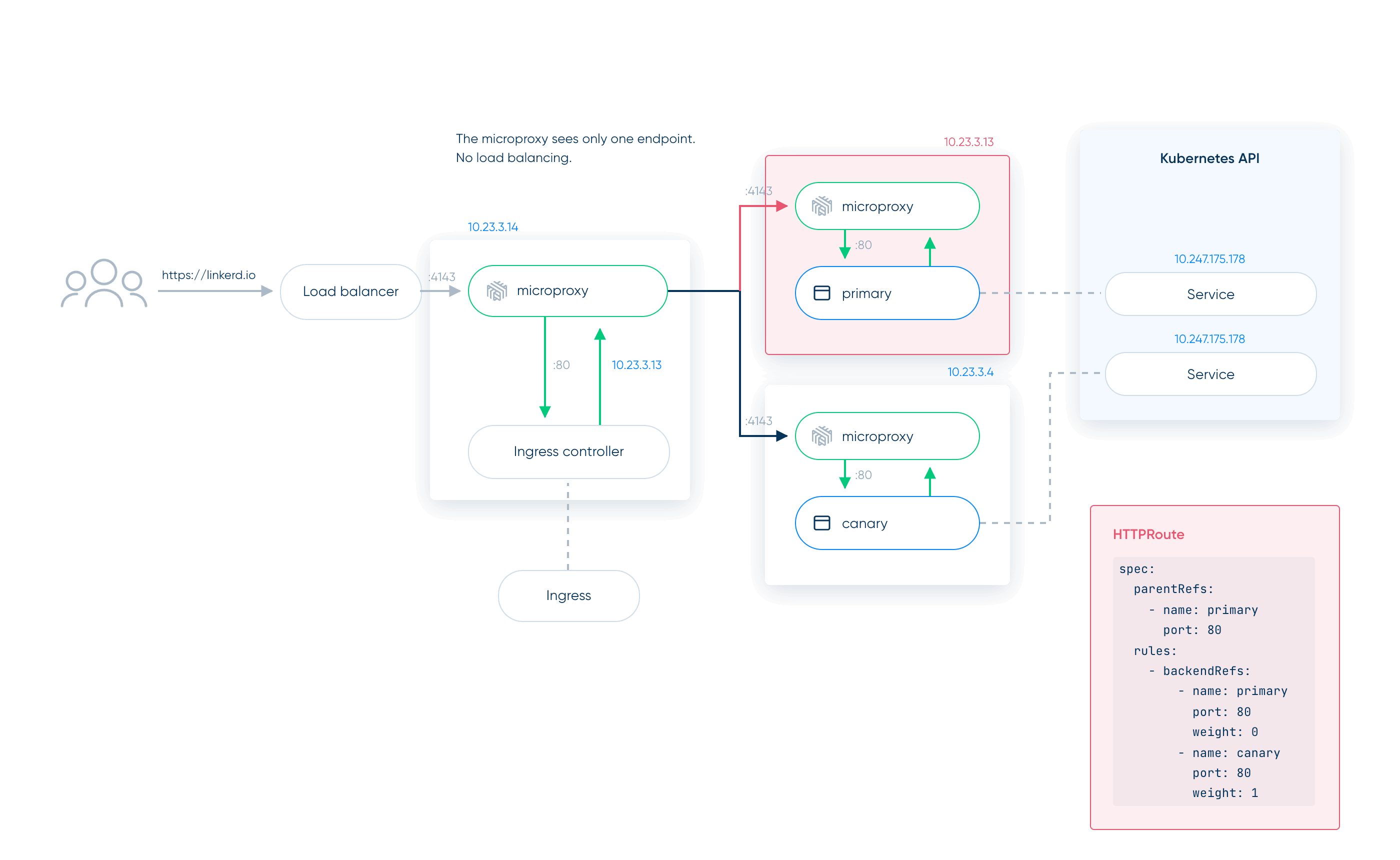
In a normal flow that's hard to notice. You quietly lose the latency-aware load balancing the Linkerd proxy would have done and fall back to whatever round-robin or similar algorithm the ingress controller uses. The real damage shows up when you do a traffic split, because the proxy can't honor HTTPRoute-based traffic splitting, and your canary breaks.
Without Service resolution, the proxy receives a pod IP the controller already chose, so the HTTPRoute weights never get a say. Suppose you have an HTTPRoute that sends 100% of traffic to a canary and 0% to the primary. If the ingress controller resolves the Service to the primary's pod IP before the proxy ever sees the request, the proxy receives a pod IP, not the Service, and your weight rules never apply. Traffic goes to the primary. The HTTPRoute looks correct and does nothing. This is the failure mode to watch for on the first day behind any new controller.
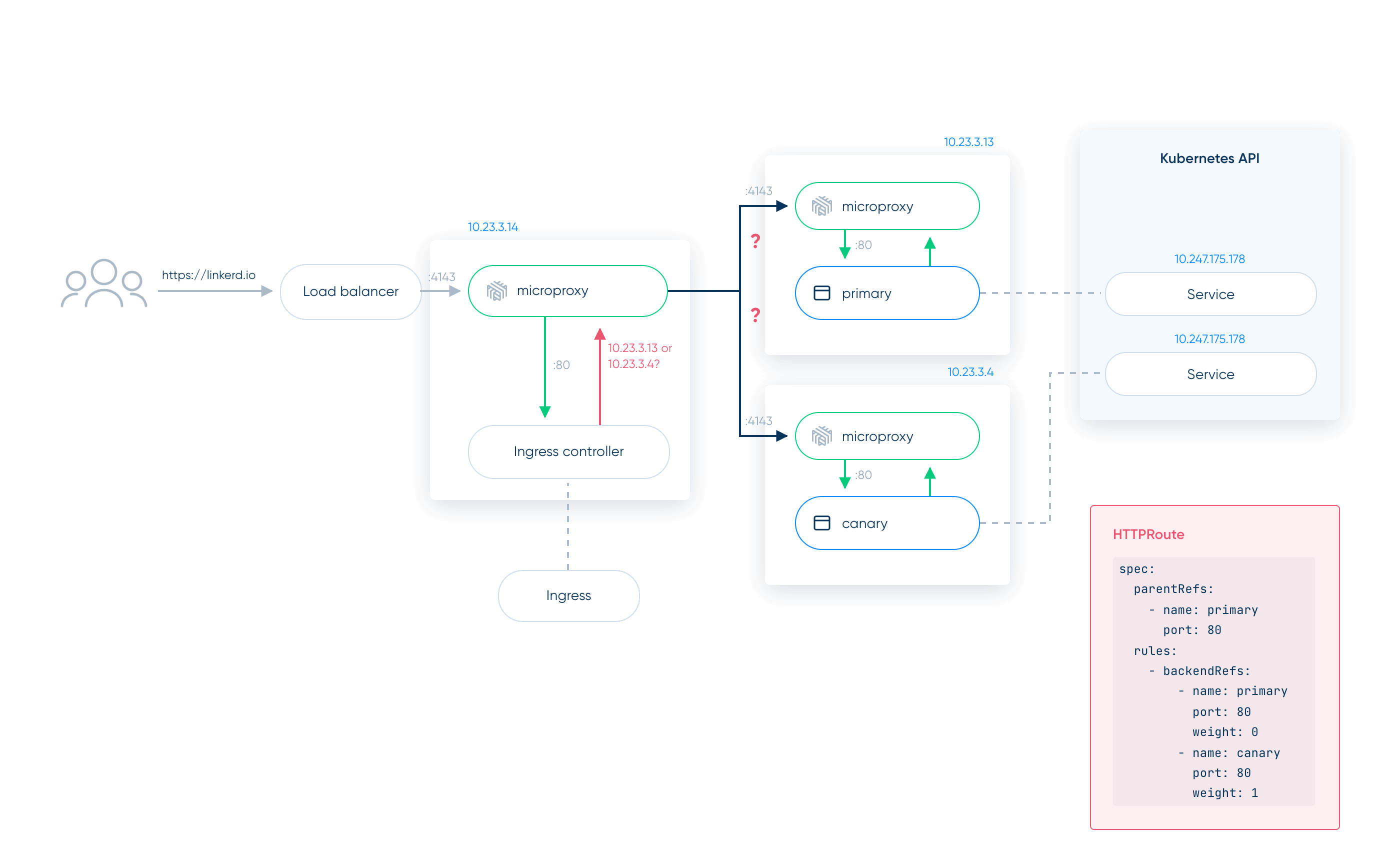
Two ways to make the handoff work
There are exactly two ways to fix this, and every ingress controller falls into one of them.
- Tell the controller to target the Service, not the pod. You turn off the controller's own endpoint selection so it forwards to the Service IP and lets the mesh handle load balancing and routing.
- Run Linkerd in ingress mode. When the controller can't be told to target the Service, you flip the proxy into ingress mode and have the controller pass the destination Service in a header.
The knob for each controller
Each controller has its own way to switch off that endpoint selection and point at the Service. For example:
- Community ingress-nginx: the nginx.ingress.kubernetes.io/service-upstream: "true" annotation.
- Kong: the
ingress.kubernetes.io/service-upstream: "true"annotation. - Traefik: the
traefik.ingress.kubernetes.io/service.nativelb: "true"annotation. - kgateway: a
Backendoftype: Static. - Envoy Gateway: an
EnvoyProxyresource withroutingType: Service. - Contour: an
ExternalNameService.
The naming varies and the exact field moves between releases, so treat the Linkerd docs as the source of truth and confirm against your controller's current version before you commit to a plan.
When the controller can't target the Service: Linkerd ingress mode
Ingress mode is the escape hatch for controllers that insist on their own endpoint selection, including older releases that predate the annotations above. You switch the injection annotation to linkerd.io/inject: ingress. That sets LINKERD_PROXY_INGRESS_MODE=true on the proxy, and at info level you'll see a log line reading outbound routing in ingress mode.
In this mode the proxy stops routing on the destination IP and starts routing on a header, l5d-dst-override. You configure the controller to add that header with the target Service's fully qualified domain name and port. With Traefik, for instance (which can also use the annotation above), that's a Middleware:
apiVersion: traefik.io/v1alpha1
kind: Middleware
metadata:
  name: l5d-header-middleware
  namespace: emojivoto
spec:
  headers:
    customRequestHeaders:
      l5d-dst-override: "web-svc.emojivoto.svc.cluster.local:80"
Now the controller can resolve to any pod IP it likes. The proxy reads the header, resolves the Service itself, applies your HTTPRoute policies, and sends the request where the weights say it should go.

How to actually migrate
The useful fact for planning is that ingress-nginx keeps working after retirement, so you don't need a big-bang cutover, and you shouldn't attempt one. A migration that holds up looks like this:
- Stand up the replacement alongside
ingress-nginx. Install the new controller, its CRDs, and its resources without moving any production traffic yet. - Recreate your routes and shift traffic gradually. Move one hostname or path at a time, watching success rate and latency as you go, rather than flipping everything at once.
- Cut over and remove
ingress-nginxonce the new controller is carrying real traffic cleanly.
Two things I'd tell any team doing this. First, size the new controller and watch its limits. Your ingress controller is a single entry point, so if you set tight resource limits and hit a traffic spike, an out-of-memory kill takes the front door down and nothing reaches the cluster. On managed nodes you also pay for that headroom, which makes the controller's resource footprint a real selection criterion rather than a footnote. Second, choose an ingress based on benchmarks run against your own workloads and pick for where you're going, not just a one-to-one swap.
ingress-nginx will keep serving traffic long enough to make this feel optional. That's only until the CVEs come pouring in, your security team is knocking at your door, and you don't want to make a rushed decision. Start the move while it's a planning exercise and not an incident, and point your team at Linkerd's Handling ingress traffic docs for the per-controller specifics.
FAQ
Is NGINX itself retiring, or only ingress-nginx?
Only the community ingress-nginx controller. NGINX the proxy and F5's commercial NGINX Ingress Controller are separate and still maintained.
Will my cluster stop working now that ingress-nginx is retired?
No. Existing deployments keep serving traffic. The risk is that new CVEs will never be patched, so plan a migration before one forces your hand.
Why does my canary ignore the HTTPRoute after I mesh the ingress?
The ingress controller resolves the Service to one pod IP, so the proxy sees a single endpoint and your weight rules never apply.
How do I make my ingress controller send traffic to the Service, not a pod?
Turn off its endpoint selection so it forwards to the Service. For example, in traefik, set traefik.ingress.kubernetes.io/service.nativelb: "true".
When do I need Linkerd's ingress mode?
Use it when a controller can't be pointed at the Service. Set linkerd.io/inject: ingress, and have it add an l5d-dst-override header.