“Certificate Expired…” Now What?


October 21, 2026
How to diagnose, fix, and prevent expired certificates from wreaking havoc in your Linkerd cluster.
Certificates are supposed to expire. Good certificate hygiene makes this a non-event: critical but unglamorous. Let’s talk about what to do when, despite our best laid plans, cluster certificates go awry. We’ll look at how to recognize and recover from expired certificates in your cluster and the practices that keep you from ever needing to.
What you’ll learn
- How to quickly figure out what broke, when to suspect an expired certificate, and how to fix it, fast.
- Why a single symptom can have more than one cause and how to tell them apart
- What best practices will help avoid the situation in the future.
TL:DR
- Use linkerd check to get a picture of the current state of your system
- If your certificates have already expired, start here ›
- If you need to rotate the trust anchor, start here ›
- If you need to rotate the identity issuer certificate, start here ›
- If you need to rotate the webhook serving certificates, start here ›
- If you’d like to start automating certificate management, start here ›
Fire alarms sound… what next?
You’re starting to get reports about weird behavior in the cluster… but, they don’t seem to point to a single smoking gun:
- “Some services can't talk to each other.”
- “Everything was fine until we restarted the pods.”
- “Our deployment is stuck.”
- “New pods are coming up without Linkerd proxies.”
- “We can't apply Linkerd policy resources.”
By themselves, none of them means a certificate has expired. But, some combinations of symptoms put cert expiry high on the list of things to investigate. Here are some telltale signs that you may have a certificate problem:
Why is this happening?
Linkerd uses cryptography to transparently establish secure network connections between your workloads. It does this through automatic mutual TLS (mTLS), which is like regular TLS, but both sides authenticate each other. This transparent automation makes secure network communication a solved problem that your developers don’t have to build and maintain (and potentially get wrong).
For this to work, all workloads need a way to prove their identities to each other. Certificates represent a cryptographically verifiable digital identity issued by a trusted authority. Whenever workloads connect, they present that identity to each other. If both trust the issuer, they can trust the identity.
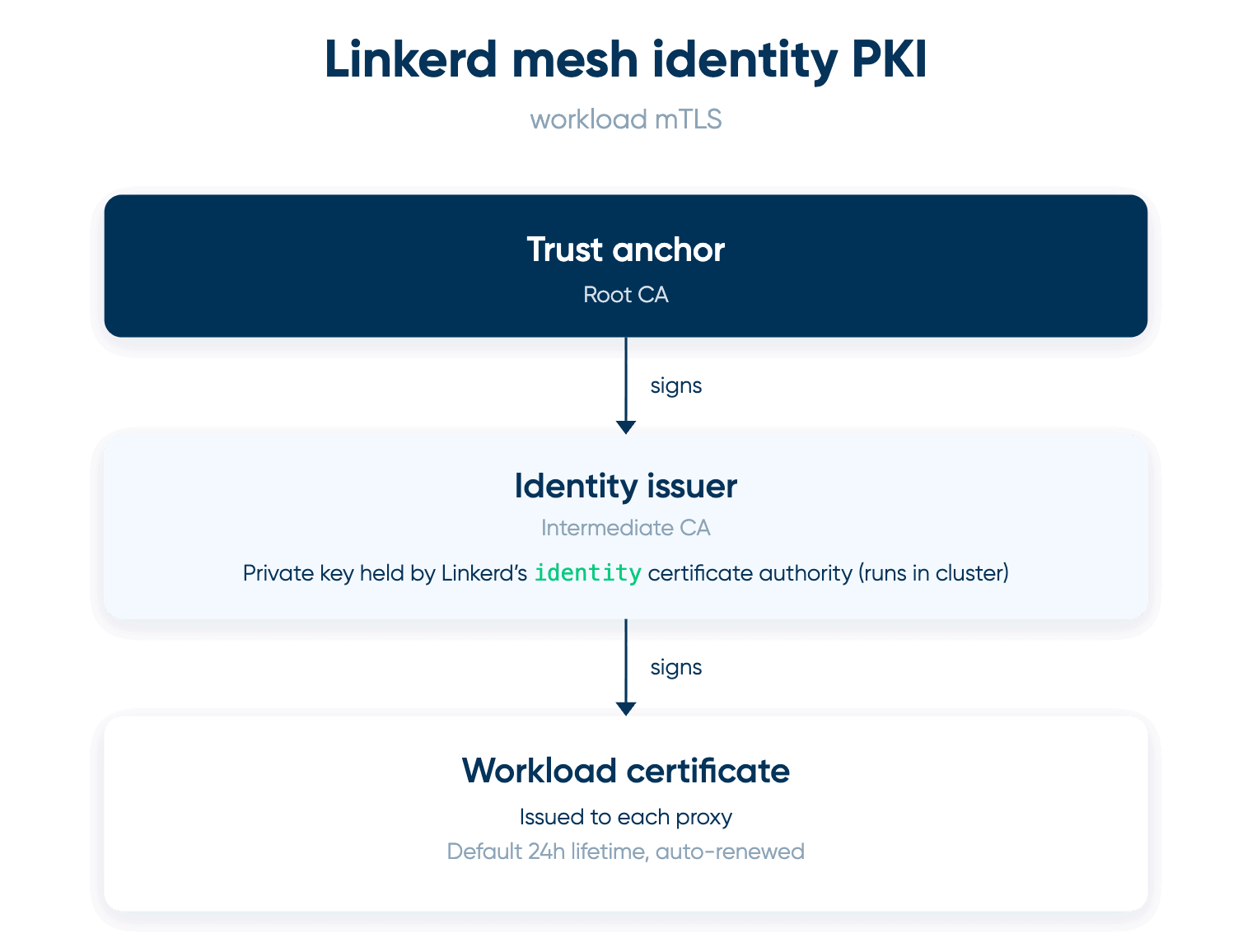
Behind those workload certificates is a small certificate-authority hierarchy. At the top is the trust anchor, the root of trust for the mesh. Usually1, the trust anchor is a self-signed root CA certificate whose private key you keep off-cluster. At configuration time, the trust anchor certificate is established as the root of trust for the cluster and distributed as part of the trust bundle to the data-plane proxies.
Beneath the trust anchor is the identity issuer, an intermediate CA whose certificate is signed using the trust anchor's private key. The identity service holds the issuer's private key and uses it to sign certificates for Linkerd proxies. The trust anchor's private key is not required by Linkerd during normal operation; it’s needed when creating or rotating an issuer. The trust anchor’s private key is particularly sensitive. Keep it secret, keep it safe (in a secret management store like Vault).
To securely join the Linkerd identity PKI, every new proxy performs a little credentials ceremony. At startup, a new proxy generates its own private key and asks Linkerd's identity service for a certificate. The identity service verifies the proxy's Kubernetes ServiceAccount credentials and, if they are valid, signs a short-lived workload certificate using the identity issuer’s private key. By default, these workload certificates are valid for 24 hours, and Linkerd manages their renewal automatically.
This ceremony lets each proxy prove its Kubernetes identity without needing to be fed a long-lived (potentially vulnerable) private key: the proxy creates its own key, and that key never has to leave the proxy. Short-lived certificates then limit how long that identity remains useful if its credentials are compromised or the workload goes away.
Note: As we saw in the triage table above, there is also a second category of certificates that’s separate from the identity hierarchy. Linkerd components such as the proxy injector and validating webhooks expose TLS endpoints to the Kubernetes API server. Their serving certificates authenticate those endpoints to Kubernetes; they are not workload identity certificates issued to proxies for mesh mTLS. Expired webhook certificates can break pod injection or resource validation while ordinary proxy-to-proxy traffic continues normally. Likewise, a healthy identity CA does not imply that every Linkerd serving certificate is healthy.
When should you suspect an expired certificate?
As a matter of course, you should start with linkerd check. Look for explicit certificate failures to make sure:
- issuer cert is within its validity period
- trust anchors are within their validity period
- webhook has valid cert checks
A few things to keep in mind when reading the check output:
- A fatal check can stop later sections from running. If a check is missing from the output, don’t assume it has passed.
- The issuer's “valid for at least 60 days” result is a warning rather than an expiry failure and does not necessarily cause a non-zero exit.
A clean control-plane check does not prove that every workload proxy currently holds a valid identity certificate.
Issues caused by an expired certificate don’t always show up exactly when the certificate expires. A certificate expiring and something breaking are not necessarily simultaneous events. An existing certificate can remain useful until renewal is required, and an established TLS connection can continue after the certificate used to establish it has expired. That's why expiration can first appear as “it broke when we restarted it.”
(For reference, we’ve done fairly extensive independent testing to see how expired certificates manifest in pathological cluster behavior. The full test suite and lab results are available on github.)
Once you’ve diagnosed an expired certificate, here’s how to fix it
The issuer has expired, but the trust anchor is still valid (and its private key is available). Recovery in this case is relatively straightforward: sign a new issuer with the existing anchor and roll it out. The mesh's root of trust doesn't change, avoiding the complexity of migrating workloads to a new root. Read more ›
A trust anchor approaching expiration is a different situation: this is a planned rotation rather than incident recovery. Linkerd's rotation process introduces the new root alongside the old one, distributes that combined trust bundle across the mesh, introduces an issuer signed by the new root, and only then removes the old root. This overlap allows workloads using either trust chain to coexist during the transition. Read more ›
Once the trust anchor has expired, that graceful migration is no longer available. Recovery means establishing a new trust anchor and issuer and restoring the control plane and workloads to a consistent trust configuration using Linkerd's expired-certificate recovery procedure. Workload restarts and other disruptive steps will be necessary. You are guaranteed to take downtime if the trust anchor ever expires. Avoiding this situation is one of the main reasons to monitor and rotate long-lived certificates well before expiration. Read more ›
Losing the trust-anchor private key is different again. It doesn't invalidate the root certificate or immediately disrupt the mesh: existing proxies can continue trusting certificates rooted in it, and the issuer can continue signing workload certificates with its own key. You’ve lost the ability to create another issuer under that root. That makes root rotation something to plan and execute while the existing anchor and issuer are still healthy, rather than something to discover when the issuer needs replacement.
Related: linkerd install generates the trust anchor internally but does not give you the generated root private key as an artifact to retain. linkerd install configuration is intended for convenience, not long-term certificate management. For production, the Linkerd documentation recommends a repeatable Helm installation and explicitly managed identity credentials. That means retaining control of the trust-anchor key (or using an external CA) and planning for issuer and trust-anchor rotation before their certificates expire. An existing CLI-installed cluster can migrate to a managed root through an overlapping trust-anchor bundle rather than waiting for its automatically generated root to expire.
An expired certificate on a single proxy usually points to a renewal failure rather than a certificate-management problem. Connectivity to the identity service, control-plane health, clock skew, workload authentication, and issuer health are more likely places to look for the underlying cause.
Finally, an expired webhook serving certificate affects a different trust relationship altogether. If mesh traffic remains healthy while admission or Linkerd resource operations fail, the affected component might be the proxy injector, policy validator, ServiceProfile validator, or a Viz/tap component. Recovery involves that component's serving certificate and the CA bundle Kubernetes uses to verify it. The webhook's failurePolicy also affects how visible—and how disruptive—the failure becomes. Read more ›
Best practices to make certificate hygiene boring
The goal of certificate hygiene is to make expiration uneventful. Issuer rotation should be automated where possible, while the trust anchor should have a deliberately chosen lifetime and a rotation plan long before that lifetime runs out. Likewise, automating webhook TLS credential rotation with cert-manager removes another class of certificate expiration from routine operations.
Trust-anchor rotation deserves particular care. It is a bundle procedure, not a swap: the old and new anchors coexist while the new trust is distributed across the mesh, a new issuer is introduced under the new anchor, and workloads transition to the new trust chain. Only then is the old anchor removed. Replacing one root with another in a single step will break trust across the mesh.
Note: Trust anchor rotation doesn’t have to be a multi-step manual procedure. Buoyant Enterprise Linkerd’s trust rotation operator reduces the workflow to a single intentional trigger, safely orchestrating the transition from the old root of trust to the new one with no downtime. Learn more ›
The trust-anchor private key also needs to be treated as a disaster-recovery asset. Keeping it securely outside Linkerd, backed up and access-controlled, preserves the ability to issue a replacement issuer without changing the mesh's root of trust. Just as importantly, the organization needs to know how to retrieve and use it. A recovery procedure that exists only on paper is worth testing periodically.
Expiration itself should be monitored rather than left to documentation or a calendar reminder. Long-lived credentials benefit from increasingly urgent warning windows—for example, planned maintenance at 90 days, a warning at 60, required action at 30, and escalation at 7. Reaching expiration should mean several earlier opportunities to intervene have already been missed.
Automation doesn't eliminate the need for monitoring. Automatically renewed credentials need monitoring of the renewal mechanism as well as their expiration dates: a certificate with plenty of time remaining can still be headed toward an outage if its next renewal is already broken. Webhook serving certificates deserve the same attention as the identity PKI; they have different failure modes, but their expiration can still turn routine Kubernetes operations into an incident.
Certificate ownership should be explicit. For every long-lived credential, it should be clear what it is for, when it expires, who or what renews it, where the signing key lives, and what happens if renewal fails. The same applies to the automation around it: when it last succeeded, how its health is monitored, and how a completed rotation is verified. When those questions have routine answers, certificate expiration becomes lifecycle maintenance rather than incident response.
Keep certificate expiration boring, prepare for excitement
Certificates are supposed to expire, and ideally their rotation is routine enough that nobody notices. But systems drift, automation fails, ownership changes, and things fall through the cracks.
Good certificate hygiene makes those incidents less likely. Automating routine rotation, monitoring expiration and renewal, and planning trust-anchor changes well in advance all reduce the opportunities for surprises.
The other half of certificate hygiene is being prepared for recovery. Knowing which certificates your cluster depends on, where the important keys live, and what the recovery procedure looks like before you need it can make recovery a lot less painful. In particular, treat the trust anchor and its private key as disaster-recovery assets: protect them, make sure they can actually be recovered, and have a tested plan for what to do if the root of trust itself needs attention.
Things occasionally go wrong. The goal is to make certificate expiration routine when everything works—and recoverable when it doesn’t.
Learn more
- Safely orchestrate trust rotation with Buoyant Enterprise Linkerd ›
- How to use linkerd check to get a picture of the current state of your system ›
- How to replace expired certificates ›
- How to manually rotate the trust anchor ›
- How to rotate the identity issuer certificate ›
- How to rotate the webhook serving certificates ›
- How to start automating certificate management ›
1Linkerd requires a trust anchor certificate, but it doesn’t need to own the corresponding root CA private key. For convenience, linkerd install generates the trust anchor and issuer credentials for you, though It’s not recommended to proceed to production with that default configuration, since you won’t have access to the private key to renew the root certificate. You can also generate your own root and keep the private key outside the cluster, typically in a secret management store like Vault.
Also, you don’t have to use a self-signed trust anchor. Some organizations use an external or corporate PKI to issue a trust anchor rooted in an external CA.
FAQ
How do I know if an expired certificate is breaking my Linkerd cluster?
Start with linkerd check and look for failures in the issuer, trust anchor, and webhook certificate checks. Suspect certificates when new connections fail while existing ones keep working, or when things break only after pods restart.
What happens if the Linkerd trust anchor expires?
You will take downtime. The graceful rotation path is gone, so you have to create a new trust anchor and issuer, then bring the control plane and workloads back to a consistent trust configuration with Linkerd’s expired-certificate recovery procedure.
How do you fix an expired Linkerd identity issuer certificate?
If the trust anchor is still valid and you have its private key, sign a new issuer with that anchor and roll it out. The mesh’s root of trust doesn’t change, so you don’t have to migrate workloads to a new root.
What’s the difference between Linkerd identity certificates and webhook certificates?
Identity certificates let proxies authenticate each other for mTLS. Webhook serving certificates authenticate components like the proxy injector to the Kubernetes API server. An expired webhook certificate can break injection or validation while mesh traffic keeps working.
How do you rotate a Linkerd trust anchor without downtime?
Rotate it before it expires, using an overlapping trust bundle. Add the new anchor next to the old one, distribute the bundle, introduce an issuer signed by the new anchor, and remove the old anchor last. Buoyant Enterprise for Linkerd’s trust rotation operator automates this.