A 2026 Practical Guide to FIPS Compliance for Kubernetes Engineers


Phil Henderson
July 9, 2026
It’s no secret that companies in regulated industries, such as healthcare and government, must meet numerous compliance requirements. One such regulation is FIPS (Federal Information Processing Standards), a set of guidelines about how customer data should be stored and encrypted to keep it safe. Compliance with anything can be a hassle, and FIPS compliance is no exception. But if you’re a Kubernetes engineer, the good news is that FIPS compliance is easier than you might think.
In this piece, we’ll dive into everything you need to know about FIPS to stay compliant: what FIPS is meant to do, the different variants (i.e., 140-2 versus 140-3), how these concepts apply to Kubernetes, and what a path to compliance looks like. To keep things practical and hands-on, we’ll show a brief example of how to make Kubernetes FIPS-compliant using BEL (Buoyant Enterprise for Linkerd), but the concepts we cover apply to any service mesh-based approach.
NOTE: It’s helpful to have some background knowledge of Kubernetes before reading this guide, especially key concepts such as control planes, worker nodes, and service meshes. If you need a refresher, check out Kubernetes Components for an overview of the key components of a Kubernetes cluster.
An introduction to FIPS and CMVP
FIPS are government-defined cybersecurity standards issued by NIST (National Institute of Standards and Technology). These standards are typically required for federal agencies, companies selling to government clients, and other companies in regulated industries such as finance and healthcare. If you’re selling a software product in any of these industries, you won’t get in the door without FIPS.
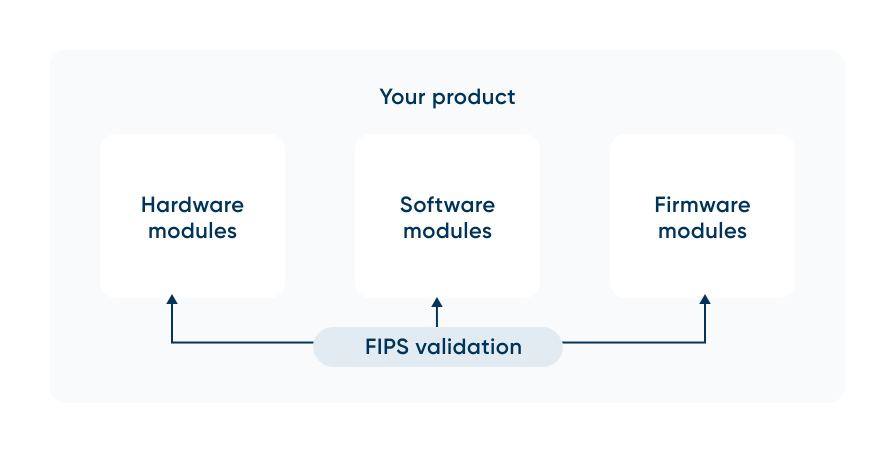
But what does FIPS actually do? At its core, FIPS is about ensuring that companies use properly validated cryptographic modules to secure their data. These modules can be hardware (e.g., physical chips or secure on-device enclaves), software (e.g., BoringSSL or OpenSSL), or firmware (e.g., secure boot loaders). These modules are validated by the CMVP (Cryptographic Module Validation Program), which assesses a module's cryptographic practices to ensure it properly encrypts and decrypts customer data. We’ll talk more about CMVPs later in this article.
To ensure FIPS compliance, you don't need to rewrite your entire application; you just need to ensure that all sensitive data is encrypted with FIPS-compliant cryptographic modules. Auditors often require evidence of which verified modules are used, where they came from, and how they’re used throughout the software supply chain. The most common way to do this is with an SBOM (Software Bill of Materials), a standard format for providing an auditable inventory of all components (including cryptographic modules) used in your product, along with their dependencies.
FIPS 140-2 vs 140-3: An overview
There are two FIPS standards currently in use: FIPS 140-2, initially published in 2001, and FIPS 140-3, initially published in 2019. You may also see references to FIPS 140-1, which is now obsolete. Both 140-2 and 140-3 are valid standards for FIPS compliance, but they have significant differences that are worth understanding.
Back in 2001, the state of software was very different, so FIPS 140-2 was primarily written to secure hardware systems. As a result, 140-2 doesn’t adequately model cryptography needs across the entire software development lifecycle. And because 140-2 is an older standard, it permits the use of weaker cryptographic algorithms (such as older versions of SHA-1), which adds security risk. FIPS 140-2 is being deprecated soon (more on that below), so don’t use FIPS 140-2 going forward if you can help it.
FIPS 140-3 addresses many of these problems. It provides better support for software, ephemeral workloads, and modern standards, including key international standards such as ISO/IEC 19790:2025 and 24759:2025. It also has stricter algorithm requirements, such as requiring block ciphers to use AES-128 or higher. Because 140-3 addresses requirements across the software development lifecycle (including design, implementation, and deployment), it’s a much better fit for modern software deployment systems like Kubernetes!
Here’s a quick summary of these differences as they relate to Kubernetes.
So, what should you choose: 140-2 or 140-3? If you’re using Kubernetes, 140-3 is the way to go for all of the reasons given above. In addition, the biggest reason is that 140-2 modules will lose active compliance for new systems after September 21, 2026. You can continue using 140-2 in existing systems, but keep in mind that 140-3 modules are higher quality and required for new systems, so it might be worth considering transitioning existing systems to 140-3. NIST has much more information about the FIPS 140-3 Transition Effort.
The FIPS module validation process
It’s important to determine whether your modules are FIPS-compliant. But first, it’s worth understanding how the validation process works. CMVP conducts the validation process, which can take anywhere from months to several years (depending on the module’s complexity), and involves the following steps:
- Vendors submit cryptographic modules (whether it’s hardware, software, or firmware) to CMVP for validation.
- CSTLs (Cryptographic and Security Testing Laboratories) test modules to verify compliance with FIPS 140-3. As of April 1, 2022, FIPS 140-2 submissions are no longer accepted.
- Once a cryptographic module is validated, it is added to the active list for 5 years, allowing companies to use it in their systems for that period. Note that this status can change; if any issues with the module are discovered after validation, its active status can be revoked.
- Once this 5-year period has elapsed, the module moves to historical status and may no longer be used. A historical status is useful because it lets you determine if a module you’re using was ever valid to begin with.
To check a module’s validation status, CMVP provides a database that anyone can use to see the validation status of any cryptographic module. In this database, you’ll find a certificate for each module, which allows you to see exactly which FIPS variant the module is compliant with. The database can help you select a new module for your product or check whether your existing modules are still valid.
Let’s take a closer look at an example of a CMVP certificate below, with good old AWS.
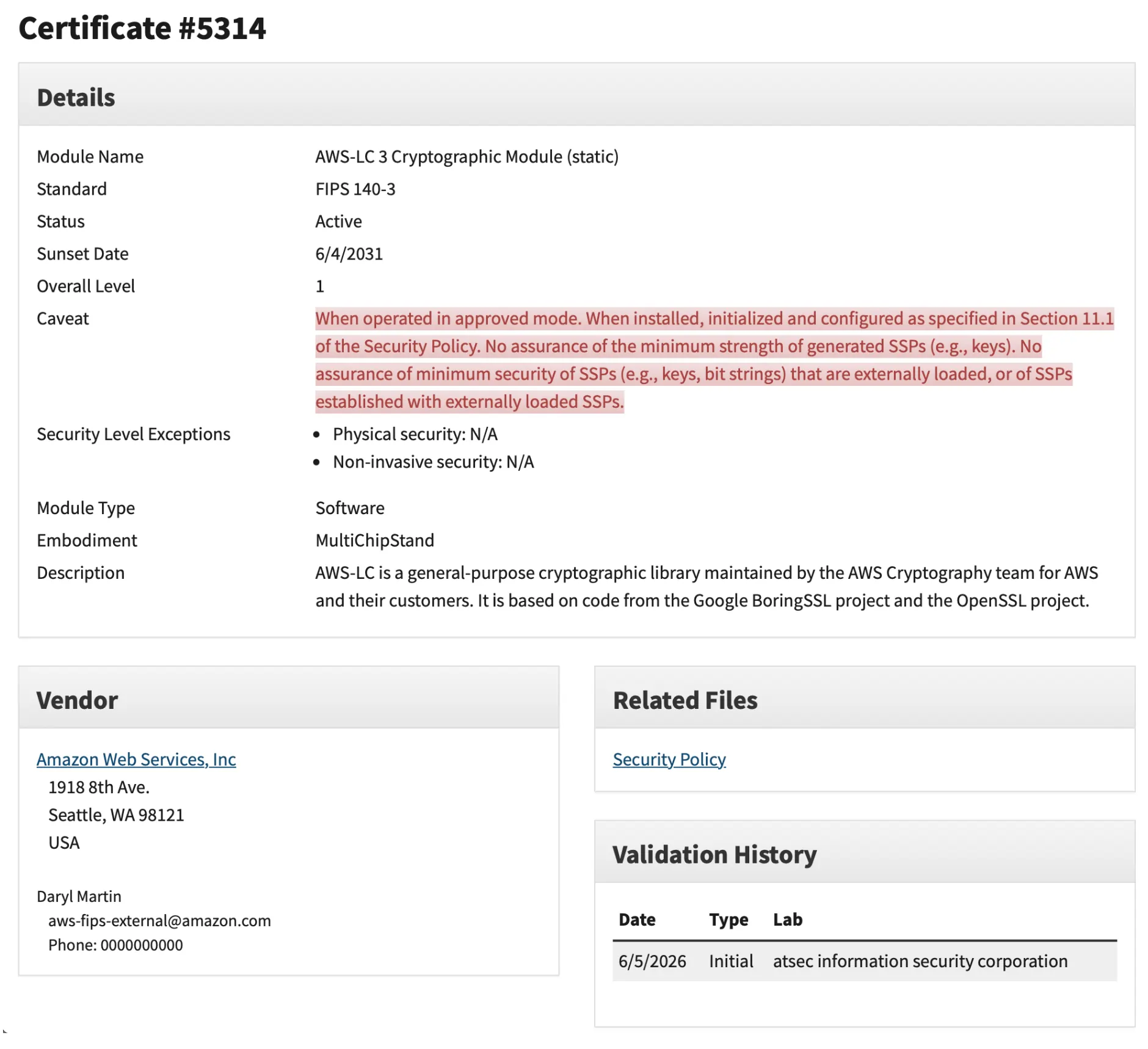
Here’s how to make sense of each of the fields:
Now that you have a better understanding of FIPS 140-3 and 140-2, it’s time to make these concepts more tangible by talking about FIPS in relation to Kubernetes.
Achieving FIPS compliance in Kubernetes
For a Kubernetes cluster to achieve FIPS compliance, every component that handles sensitive information must adhere to FIPS standards, both at rest (e.g., data stored on disk) and in transit (e.g., data moving between components). Sensitive data includes customer information, such as authentication credentials, API keys, cryptographic keys, business data, and Personally Identifiable Information (PII). This is quite a lot of surface area, as most Kubernetes components interact with sensitive data in some form, including the host operating system and several control planes, nodes, and cluster add-on components.
To understand how to achieve compliance across all this surface area, let’s take a closer look at each component and how it interacts with sensitive data, starting with the control plane. The Kubernetes control plane has three parts that interact with sensitive data:
- etcd: The source of truth for the cluster; it contains secrets and service account tokens. If an attacker gains access to etcd, they control the cluster.
- kube-apiserver: the communications gateway for the control plane. It’s used to manage secrets and auth tokens.
- kube-controller-manager: Runs the core control loops shipped with Kubernetes. It manages the creation of service account tokens and can indirectly touch the data of sensitive workloads.
Nodes also have two main components that interact with sensitive data.
- kubelet: The primary agent that runs on every worker. It fetches secrets and mounts them as environment variables in pods.
- CRI (Container Runtime): Responsible for running containers. It holds active environment variables in memory and manages container image pull secrets. It also writes logs that may contain PII or credentials.
Finally, there are a few cluster add-ons that also interact with sensitive data:
- CSI (Container Storage Interface) plugins: Third-party storage drivers that manage volumes. These are persistent volumes that contain sensitive application data.
- CNI (Container Network Interface) plugins: The network plumbing of the cluster. They route data between pods and external systems. If applications transfer sensitive data, this passes directly through CNI.
- API server audit logger: Subsystem that records activities in the cluster. These audit logs can contain plaintext sensitive data from API calls (e.g., kubectl create secret).
Here’s a simplified diagram of the components that need to be FIPS-compliant.
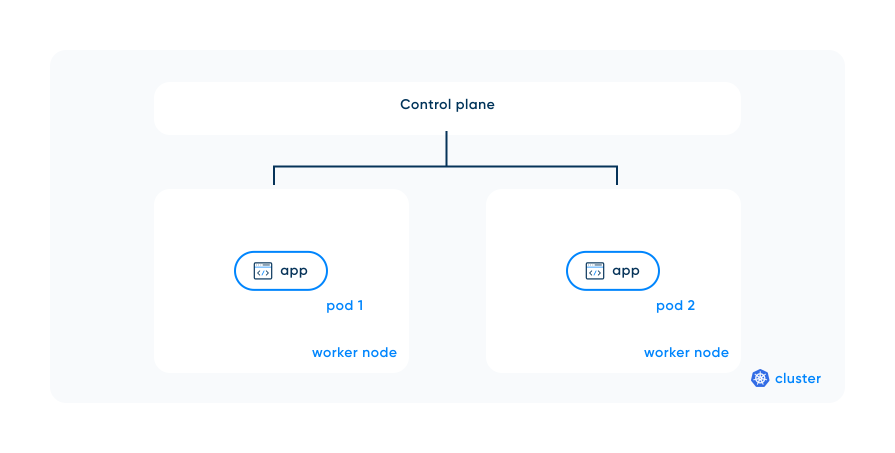
To keep things simple, we’ll primarily talk about FIPS compliance in the context of the control plane and nodes. However, it’s important to note that achieving FIPS compliance across these components requires securing data both at rest and in transit. Here’s how to think about each case:
- Data at rest: Requires FIPS-validated cryptographic modules (e.g., AES-256) and secure key management.
- Data in transit: Ensure that your Kubernetes network traffic uses FIPS-validated cryptographic modules (e.g., FIPS-compliant TLS implementations). For additional guidelines on the use of TLS, see Guidelines for the Selection, Configuration, and Use of Transport Layer Security (TLS) Implementations.
NOTE: In this article, we’ll focus on data in transit, but keep in mind that data at rest needs to be secured with FIPS-compliant modules too.
FIPS-validated mesh: a simpler approach to securing data in transit
Normally, to achieve FIPS compliance, you would need to make all your microservices FIPS-compliant to secure data in transit between them. To do this, you not only need to update your own application code, but all of your application’s third-party dependencies. This can quickly turn into a huge project that consumes all of your engineering team’s bandwidth, distracting from the actual product features you want to build. Fortunately, there’s a faster path to achieving FIPS compliance for Kubernetes data in transit: a service mesh.
A service mesh, like Linkerd, is a software layer that adds security, reliability, and observability features to applications deployed as microservices in each pod. The mesh simplifies security for the Kubernetes data plane (i.e., the infrastructure responsible for running and managing the workloads) by giving each microservice its own proxy. These proxies (often implemented as sidecar proxies) handle all of the network traffic between pods/services. With a FIPS-compliant service mesh, you don’t need to change any of the application code in your microservices to achieve FIPS compliance for data in transit; you can just use the service mesh.
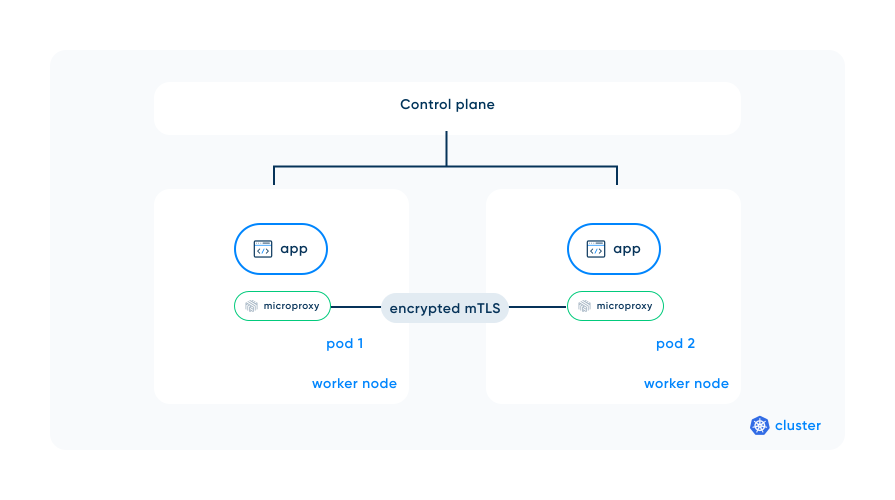
There are two types of proxies: microproxies (i.e., small, single-purpose proxies) and general-purpose proxies (i.e., highly configurable but resource-heavy). When deciding which to choose, the two trade-offs to consider are resource footprint and out-of-the-box FIPS readiness. If you want more information, check out Sidecars or Sharing: A Practical Guide to Selecting Your Service Mesh for more details on choosing the right service mesh for your needs.
A hands-on example with Kubernetes and Buoyant Enterprise for Linkerd
To give you a more concrete idea of what it looks like to set up a FIPS-validated mesh, let’s see how this is done using BEL (Buoyant Enterprise for Linkerd). BEL is a lightweight FIPS-validated mesh for Kubernetes with Rust-based sidecar microproxies, making it very fast and simple to get started and reducing critical safety issues often found in C++ based proxies. It can also generate an SBOM to prove to auditors that you’re using FIPS-compliant cryptographic modules.
You can set up BEL in a couple of steps:
1. Use your current BEL key, or get one for free by signing up here - the key will be in your portal
2. Install your service mesh’s CLI or SDK locally. The BEL CLI can be installed with:
curl --proto '=https' --tlsv1.2 -sSfL https://enterprise.buoyant.io/install | LINKERD2_VERSION=enterprise-2.19.9 FIPS=1 sh3. Start your local cluster via KinD or otherwise, as long as kubectl has the appropriate kubeconfig context set. Below is the command to start a local KinD cluster.
kind create cluster4. Install your service mesh into your cluster. You can install the Kubernetes Gateway API with:
kubectl apply -f https://github.com/kubernetes-sigs/gateway-api/releases/download/v1.2.1/standard-install.yaml5. Now you can install BEL with:
linkerd install --crds | kubectl apply -f -linkerd install | kubectl apply -f -6. Verify that your service mesh is installed and uses FIPS-compliant cryptographic modules. Run the following commands to install the BEL FIPS dashboard:
helm upgrade -i -n monitoring --create-namespace \
    linkerd-dashboard \
    oci://ghcr.io/buoyantio/charts/linkerd-dashboard
kubectl rollout status -n monitoring deploy
kubectl -n monitoring port-forward \
    deployments/linkerd-dashboard 8081:8080 &
7. As a final validation step, open the dashboard at http://localhost:8081 to see that you’re using a FIPS-compliant cryptographic module.
.webp)
And just like that, you have set up your first FIPS-validated mesh! A gentle reminder: This approach only works for data in transit, but FIPS compliance also requires you to encrypt data stored on disk. For a more detailed guide to using BEL, see Installing FIPS-compliant BEL.
Conclusion
Now that you know the difference between FIPS, CMVP, sidecars, and service meshes, go forth and use your new compliance superpowers for good! If you want to go deeper on any of these topics, the following links should get you started:
- What is a Service Mesh? Service Mesh Explained
- Sidecars or Sharing: A Practical Guide to Selecting Your Service Mesh
- Installing FIPS-compliant BEL
FAQ
What's the difference between FIPS 140-2 and FIPS 140-3?
FIPS 140-2 (2001) was written for hardware and still allows weaker algorithms like older SHA-1. FIPS 140-3 (2019) adds support for software modules, runtime self-tests, and non-modifiable operational environments, a better fit for Kubernetes.
Do you need to rewrite your application to achieve FIPS compliance?
FIPS compliance doesn't require rewriting your application. You just need to ensure sensitive data is encrypted with FIPS-validated cryptographic modules. Auditors typically want an SBOM showing which validated modules you use and where they came from.
When does FIPS 140-2 stop being valid for new systems?
FIPS 140-2 modules lose active compliance for new systems after September 21, 2026. You can keep using 140-2 in existing systems, but new systems should use FIPS 140-3 modules.
How does a service mesh help with FIPS compliance in Kubernetes?
A service mesh like Linkerd gives each microservice a sidecar proxy that handles FIPS-compliant mTLS between pods. You don't need to change your application code or its dependencies to secure data in transit.